URDF Robot Model
URDF Robot Model
This tutorial provides an introduction to creating and configuring robot models using URDF (Unified Robot Description Format) in ROS 2.
Overview
A robot model defines the robot's physical structure and geometric shape. In ROS, the robot model is primarily described using URDF together with 3D models (STL files are commonly used as examples).
While STL describes the visual mesh of each component, URDF defines:
- The structure and relationships between each part of the robot
- Joint connections and movements
- Physical properties (mass, inertia, friction)
- Transforms between links
What is URDF?
URDF (Unified Robot Description Format) is an XML-based file format used to describe robotic systems in ROS.
Key Features:
- Defines how all parts (links) are connected through joints
- Contains transform, inertia, and physical properties
- Uses STL files to visualize each link
- Follows a structured XML format
Basic Structure
A URDF file is organized under the <robot> tag and includes:
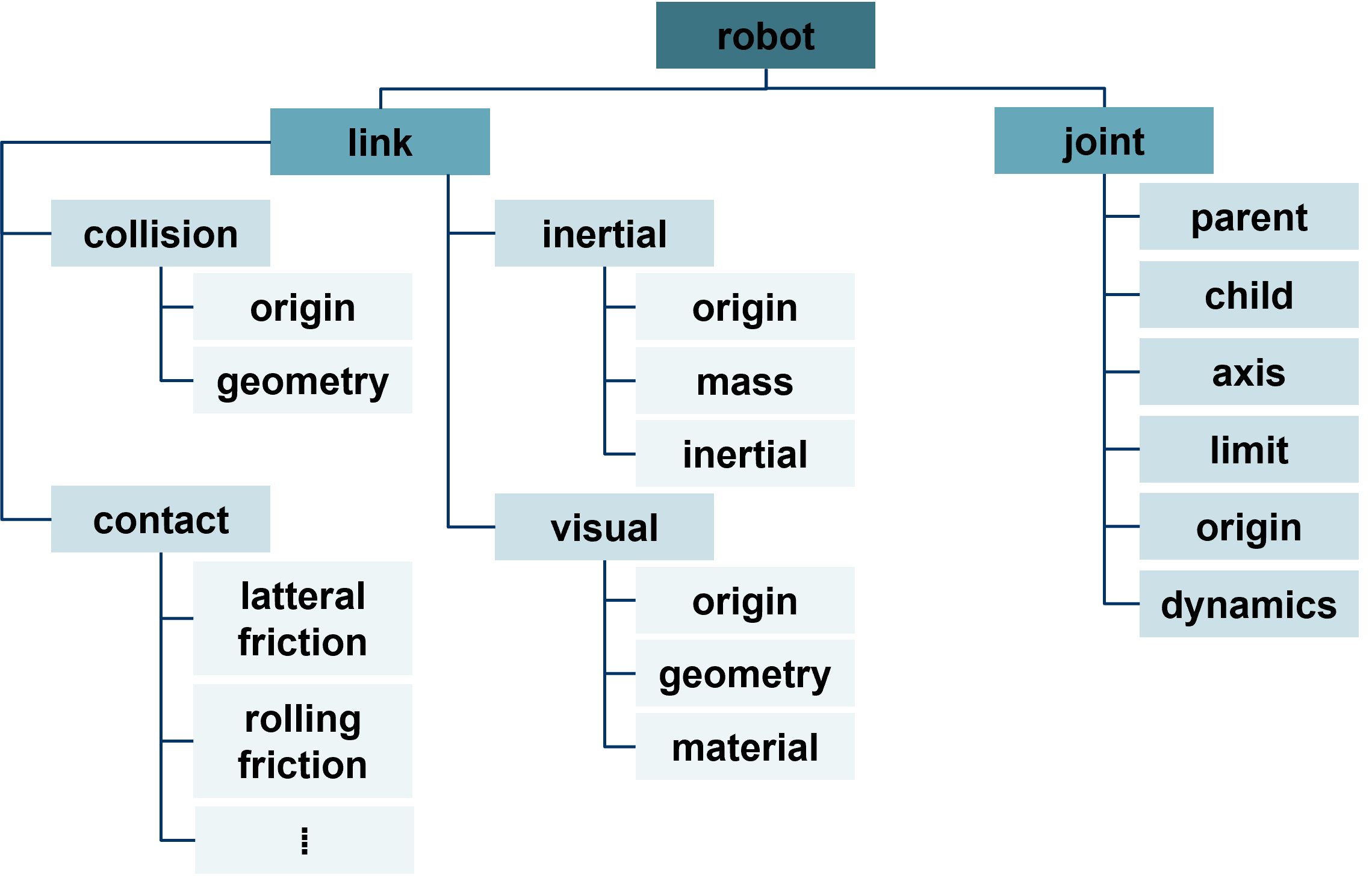
<robot name="robot_name">
  <!-- Link definitions -->
  <link name="link_name">
    <visual>...</visual>
    <collision>...</collision>
    <inertial>...</inertial>
  </link>

  <!-- Joint definitions -->
  <joint name="joint_name" type="revolute">
    <parent link="link1"/>
    <child link="link2"/>
    <axis xyz="0 0 1"/>
    <limit lower="-3.14" upper="3.14" effort="100" velocity="1.0"/>
  </joint>
</robot>
Visualizing Robot Models in RViz2
Before adjusting URDF parameters, it's recommended to learn how to visualize your robot model in RViz2.
Step-by-Step Guide:
1. Launch the URDF Node
First, launch a node that includes your URDF file. This will publish the robot description to the ROS2 parameter server.
2. Open RViz2 and Add a Display
In the RViz2 interface:
- Click the "Add" button in the lower-left corner
- Select "RobotModel" from the display types list
3. Configure the RobotModel Display
In the newly added RobotModel panel:
- Set the Description Source to Topic
- Ensure the robot description is being published correctly
4. Troubleshooting
If the model doesn't appear:
- Try toggling the "Visual Enabled" checkbox on and off
- The robot model should then be displayed
5. Managing Links
Under the Links section:
- You can choose which links to display individually
- Toggle visibility of specific parts as needed
- Hide links for focused visualization of specific components
Coordinate Systems and Transforms
Before adjusting URDF parameters, it's recommended to understand TF2 (Transform Library) in ROS 2.
Right-Hand Rule
You can use the right-hand rule concept to help adjust parameters:
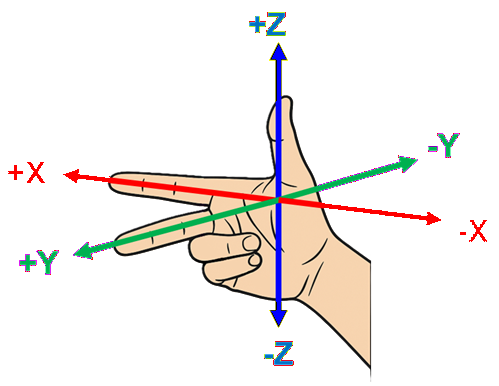
Thumb    → X-axis (positive)
Index    → Y-axis (positive)
Middle   → Z-axis (positive)
The direction in which each finger points represents the positive axis, while the opposite direction represents the negative axis.
Summary
URDF is essential for:
- Robot visualization in RViz2
- Simulation and physics calculations
- Kinematics and dynamics computations
- Robot calibration and parameter adjustment