URDF Robot Model
URDF(Unified Robot Description Format)是 ROS 2 用來描述 Robot Physical Structure 的 XML 格式,包括 Link、Joint 與 Geometry,讓 RViz2、TF2 與 Motion Planning Framework 等工具可以用一致的方式理解 Robot Model。
概述
Robot Model 用來描述機器人的 Physical Structure 與 Geometry。
在 ROS 2 中,這些資訊主要透過 URDF 描述,並搭配 3D Mesh File(常見格式包括 STL 或 DAE)呈現 Visual 與 Collision Geometry。
Mesh 描述的是某個零件「看起來是什麼樣子」,而 URDF 則定義各個零件如何連接、如何移動,以及它們的 Physical Property。
為什麼重要
URDF 是讓 Visualization(RViz2)、Coordinate Frame(TF2)與 Motion Planning(參考 Manipulation 的 Motion Planning)彼此一致的重要 Robot Description。
如果 URDF 中出現錯誤,例如缺少 Joint Limit、Axis 方向顛倒、Parent / Child Link 設定錯誤,那麼所有建立在這份 Robot Model 上的工具都會繼承相同問題。
核心概念
URDF 描述哪些內容
- Links:Rigid Body,包括 Visual Mesh、Collision Geometry 與 Inertial Property。
- Joints:描述一個 Link 相對於另一個 Link 如何移動,例如
revolute、prismatic、continuous、fixed等,並可包含 Motion Limit。 - Transforms:Joint Origin 所定義的固定 Geometry Offset,再加上 Joint Motion,共同決定 Parent Link 與 Child Link 之間的關係。TF2 與
robot_state_publisher會使用這些資訊計算 Robot 的即時 Coordinate Frame。可參考 TF2。
基本結構
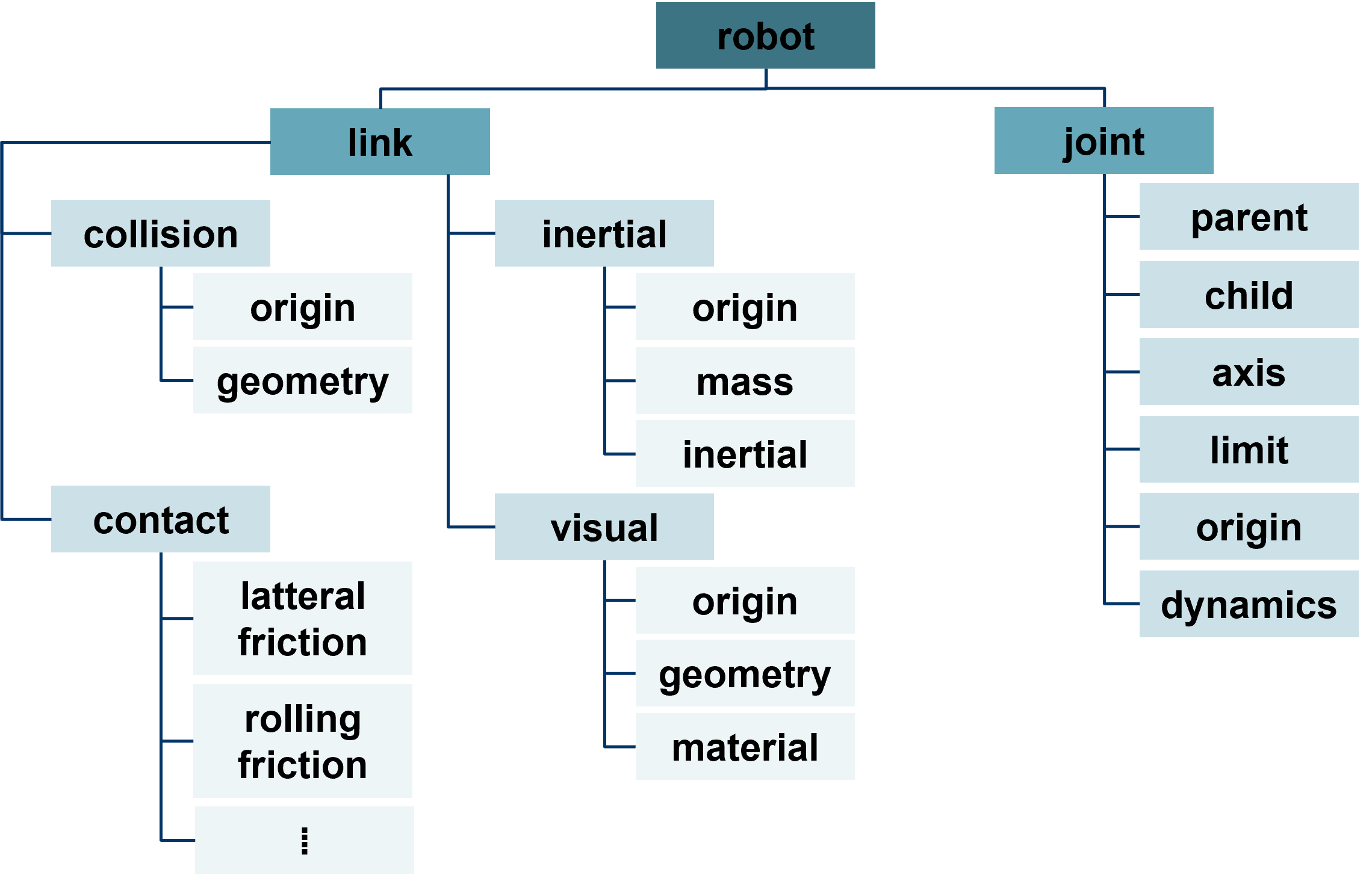
<robot name="robot_name">
  <!-- Link definitions -->
  <link name="link_name">
    <visual>...</visual>
    <collision>...</collision>
    <inertial>...</inertial>
  </link>

  <!-- Joint definitions -->
  <joint name="joint_name" type="revolute">
    <parent link="link1"/>
    <child link="link2"/>
    <axis xyz="0 0 1"/>
    <limit lower="-3.14" upper="3.14" effort="100" velocity="1.0"/>
  </joint>
</robot>
從 URDF 到即時 TF Tree
URDF File 本身只描述 Robot 的 Kinematic Structure,不會自行發布任何 Transform。
執行期間,robot_state_publisher 會將 URDF 與即時 /joint_states Message 結合,計算並發布實際的 Link Transform 到 /tf 與 /tf_static。
這個流程的完整說明與常見問題可參考 TF2。
URDF 與 ros2_control
URDF 可以選擇性加入 <ros2_control> Tag,用來描述哪些 Joint 可以被控制,以及背後使用哪一種 Hardware Interface。
這在實體 Manipulator 或 Mobile Base 中很常見,但不是必要條件。如果 Robot Model 只用於 Visualization,或僅用於 Simulation,也可以完全不包含 <ros2_control>。
關於 ros2_control 如何整合到完整 Manipulator Control Stack,可參考 Manipulation 章節中的 Arm Action。
實作步驟:在 RViz2 中顯示 URDF
1. 發布 Robot Description
啟動 robot_state_publisher,並將 Robot Description 載入它的 robot_description Parameter。
依 ROS 2 Distribution 與使用工具不同,Robot Description 也可能透過 robot_description Topic 提供給 RViz2 等 Consumer 使用。
2. 開啟 RViz2 並加入 Display
在 RViz2(RViz2)中:
- 點選左下角的 Add。
- 從 Display Type List 中選擇 RobotModel。
3. 設定 RobotModel Display
- 將 Description Source 設定成與目前 Robot Description 提供方式相符的來源,例如 Topic,或在 RViz2 版本支援時使用 File。
- 確認所選 Source 中包含有效的 Robot Description。Source 無法取得或內容無效,是 Robot Model 無法顯示的常見原因。
4. 排查 Display 問題
如果 Model 沒有出現,可以先將 Visual Enabled 關閉後再重新開啟,並確認 RViz2 的 Fixed Frame 存在於目前 TF Tree 中。可參考 TF2。
5. 管理 Link 顯示
在 RobotModel Display 的 Links 區段中,可以單獨切換各個 Link 的 Visibility,方便只觀察特定 Robot Part。
Coordinate System 與 Transform
在調整 URDF Joint Parameter 之前,請先熟悉 TF2 中介紹的 Frame 與 Right-hand Rule,因為 URDF 中的 Joint Axis 與 Transform Offset 也遵循相同慣例。
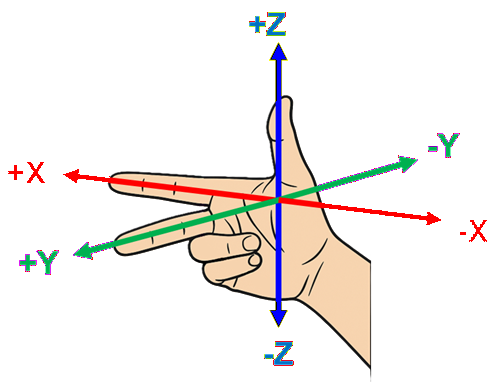
Thumb    → X-axis (positive)
Index    → Y-axis (positive)
Middle   → Z-axis (positive)
每根手指所指的方向代表該 Axis 的正方向,相反方向則為負方向。
這個慣例決定 Joint Axis 的正方向,而 Joint Limit 也會以該 Joint Coordinate Convention 為基準表示。
預期成果
RViz2 的 RobotModel Display 應該能正確顯示所有 Robot Link 的相對位置。
當 /joint_states 發生變化時,Robot Model 應該會即時更新,不需要重新啟動 RViz2 或 Robot Description Publisher。
常用指令
ros2 param get /robot_state_publisher robot_description | head -c 200   # confirm it is set (long output)
ros2 topic echo /joint_states
ros2 run tf2_tools view_frames                                          # confirm every link has a TF parent
常見問題
- RobotModel Display 一直是空的 — Robot Description 可能沒有被發布,或 Description Source 與實際提供方式不一致。可以使用
ros2 topic list | grep robot_description,或檢查對應 Parameter。 - Model 有顯示,但不會移動 —
/joint_states沒有被發布,或 URDF 中的 Joint Name 與/joint_statesPublisher 使用的名稱不一致。 - 部分 Link 缺少或彼此斷開 — 執行
ros2 run tf2_tools view_frames(參考 TF2),確認每一個 Link 都有一條連續的 Parent Chain 可以回到 Root Frame。 - Motion 看起來鏡像或 Rotation 方向錯誤 — 重新確認 Joint
axis的正負方向是否符合上方 Right-hand Rule。Axis 方向寫反是 URDF Authoring 中常見的錯誤。
重點整理
- URDF 描述 Robot Structure,包括 Link、Joint、Limit、Inertial Property 與 Visual Property;它本身不會發布即時 Transform。
robot_state_publisher會將 URDF 與/joint_states結合,產生 RViz2、MoveIt 與其他工具使用的即時 TF Tree。ros2_control常用於實體 Robot,但不是每一份 URDF 都必須包含。- URDF 對 Visualization、Simulation、Kinematics / Dynamics 與 Motion Planning 都很重要,因此應儘早確認 Axis Convention 與 Joint Limit 是否正確。
下一步
如果還不熟悉 TF,可以接著前往 TF2;也可以繼續到 Gazebo,將相同的 Robot Model 放入模擬環境中進行 Physical Simulation。