Wifi Solution: Wake on WLAN on AFE-R750
Implementation guide for Wake-on-WLAN (WoWLAN) on AFE-R750 with EWM-W179 module.
Use Case
Application: AFE-R750 as AMR (Automated Mobile Robot) controller
Requirements:
- Save battery power by suspending AFE-R750 when AMR reaches target position
- Wake via WoWLAN (Wi-Fi) when AMR needs to move to other position
Background Analysis
Key Points:
- ✅ Wi-Fi module is still alive if AFE-R750 suspends
- ✅ Wi-Fi module supports wake-up function
- ✅ AFE-R750 hardware has dedicated wake-up pin
- ✅ AFE-R750 BSP supports wake-up function
Implementation Steps
Step 1: Power Verification
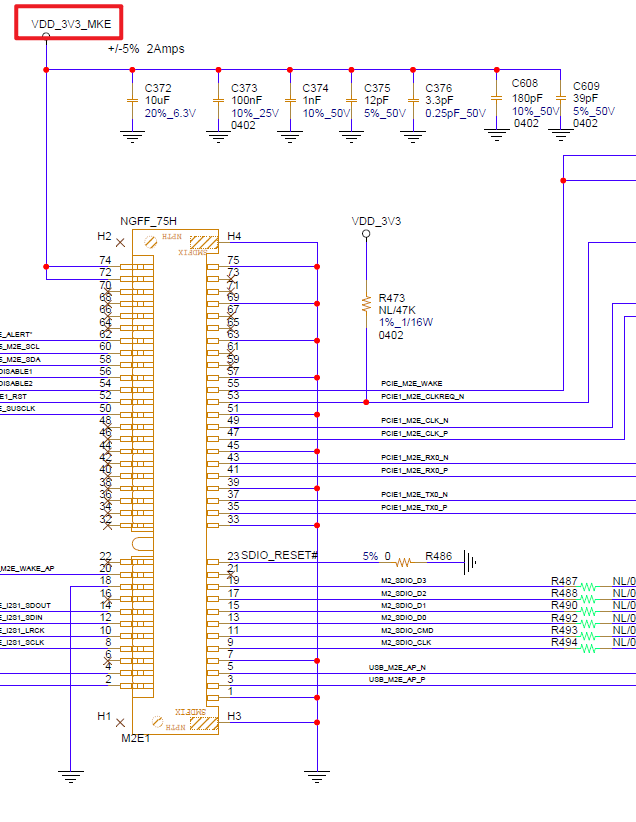
Basic Checking Method: Measure the VDD_3V3_MKE pin voltage.
Result: After AFE-R750 suspends, the VDD_3V3_MKE pin still has 3.3V.
Step 2: Driver Compilation
EWM-W179 supports wake-on-function, but its driver must be re-compiled with WOWLAN=y.
Set Up Environment:
sudo rm -r /lib/modules/$(uname -r)/build
sudo rm -r /lib/modules/$(uname -r)/source
sudo cp -r /usr/src/linux-headers-5.15.148-tegra-ubuntu22.04_aarch64/3rdparty/canonical/linux-jammy/kernel-source /lib/modules/$(uname -r)/build
sudo ln -s /lib/modules/$(uname -r)/build /lib/modules/$(uname -r)/source
sudo cp -r /lib/modules/$(uname -r)/build/arch/arm64 /lib/modules/$(uname -r)/build/arch/aarch64
Then follow the FAQ to build Wi-Fi driver with wake-on-function.
📥 Download: FAQ to build Wi-Fi driver
Important: Ensure your build environment matches the requirements in the FAQ document before proceeding.

Step 3: Test Wake Function
After installing new driver:
- Set AFE-R750 to suspend
- Send wake-up packet by MAGPAC utility
- Measure M.2 A+E key pin 55 (wake-up pin) by voltage meter
Expected Behavior:
- When AFE-R750 suspends: Pin 55 is HIGH
- EWM-W179 receives wake-up packet: Pin 55 becomes LOW
Result: Wake-on-WLAN function is working on Wi-Fi module.
Step 4: Hardware Design Verification
PCIE_WAKE_N Signal: Check that PCIE_WAKE_N signal and M.2 pin 55 are connected via R464.
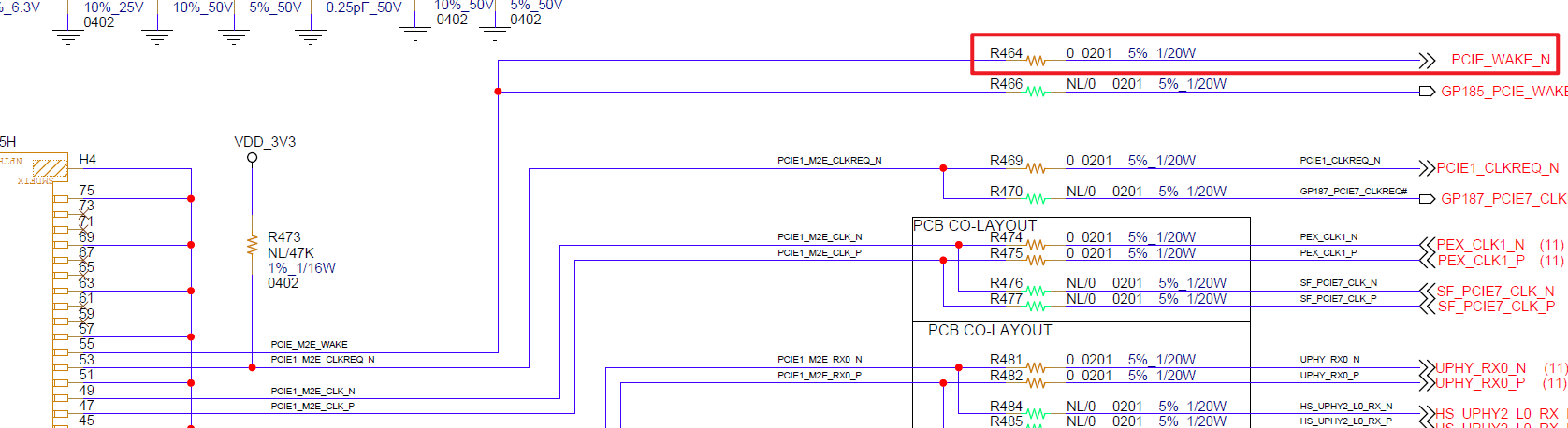
GPIO Configuration: PCIE_WAKE_N is connected to SoC PEX_WAKE_N, A8 pin which also is GPIO L,2 pin.


So the last part is BSP supporting wake-on by GPIO L,2.
Step 5: BSP Configuration
Checking with vendor, WOW function needs to add these items into BSP:
- Wake event should include GPIO L,2
- GPIO L,2 should be HIGH in default, and active LOW
- GPIO L,2 default be occupied by wake-on-WLAN function
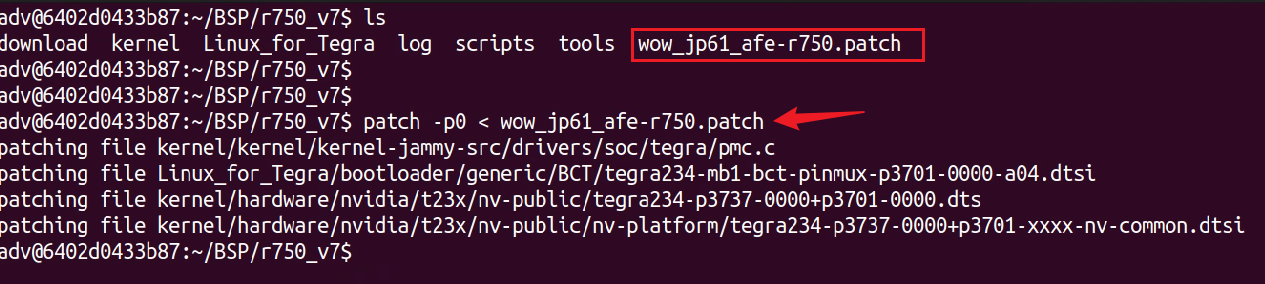
Apply Patch:
patch -p0 < wow_jp61_afe-r750.patch
📥 Download: BSP Patch (wow_jp61_afe-r750.patch)
Note: Apply this patch before compiling your BSP to enable complete WoWLAN functionality.
Step 6: Final Setup
After the patched BSP is compiled and image is flashed into AFE-R750:
- Verify: Make sure the probed Wi-Fi driver has enabled WOW function
- Enable WOW:
sudo iw phy0 wowlan enable any - Test Wake:
sudo wakeonlan <MAC with :>
Result: AFE-R750 can be woken if Wi-Fi receives wake-on packet from MAGPAC or wakeonlan command.