Robotic Suite Basic Installation Guide
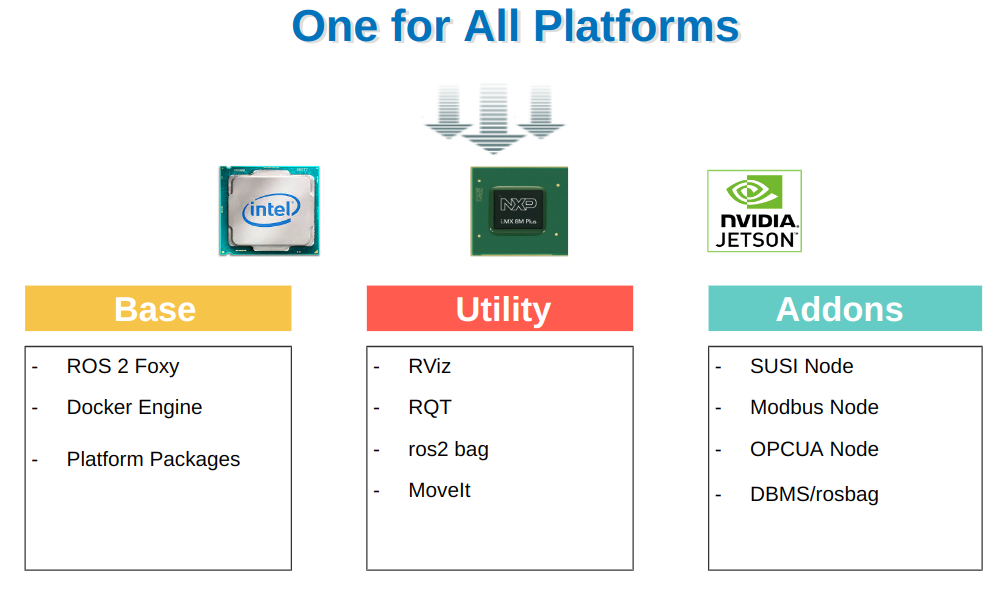
Advantech Robotic Suite provides a consistent installation experience for Advantch platforms (eg. Intel, ARM - NXP i.MX 8M, NVIDIA Jetson and Qualcomm).
Users can easily install and set up the ROS2 environment to quickly start developing robot applications (example: AMR, AGV, Fleet Management ...).
Download
Download Advantech Robotic Suite
Install
Note: Make sure your target system satisfies the following conditions:
- Advantech platforms with certified Ubuntu Desktop 20.04, 22.04 or 24.04 LTS with SUSI driver and WISEAgent installer (WISEAgent v2.0.0 or higher is not supported)
- At least 8 GB hard drive free space
- At least 8 GB RAM
- An active Internet connection is required
- Use the English language environment in Ubuntu OS
Install the Advantech Robotic Suite:
$ tar zxfv adv-robotic-suite-installer-<version>.tar.gz
$ sudo ./adv-robotic-suite-installer.run
Make sure you see a message on the last line that the installation is complete, then please restart your computer to complete the environment setup.

If you encounter any issues during the installation process, please refer to [Q&A].
Verify
Verify on Ubuntu 20.04 or 22.04
Step 1: Update ROS2 environment variables:
$ source ~/.bashrc
Step 2: Print ROS2 environment variables:
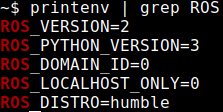
$ printenv | grep ROS
Step 3: If the installation is successful, you will see output similar to:
Verify on Ubuntu 24.04
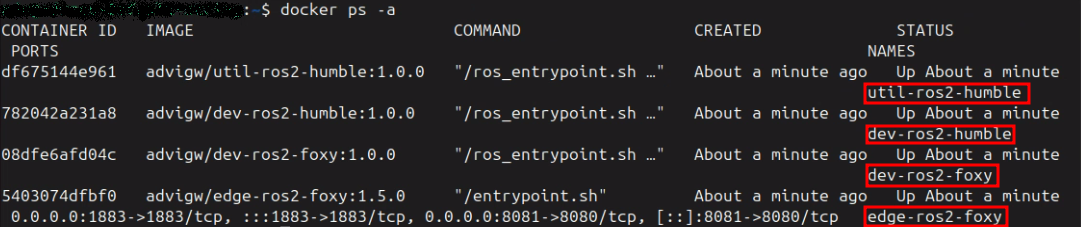
Step 1: Check Advantech Robotic Suite container has been created:
Uninstall
Command to uninstall the Advantech Robotic Suite:
$ cd /usr/local/Advantech/ros
$ ./uninstall.sh