Model Training
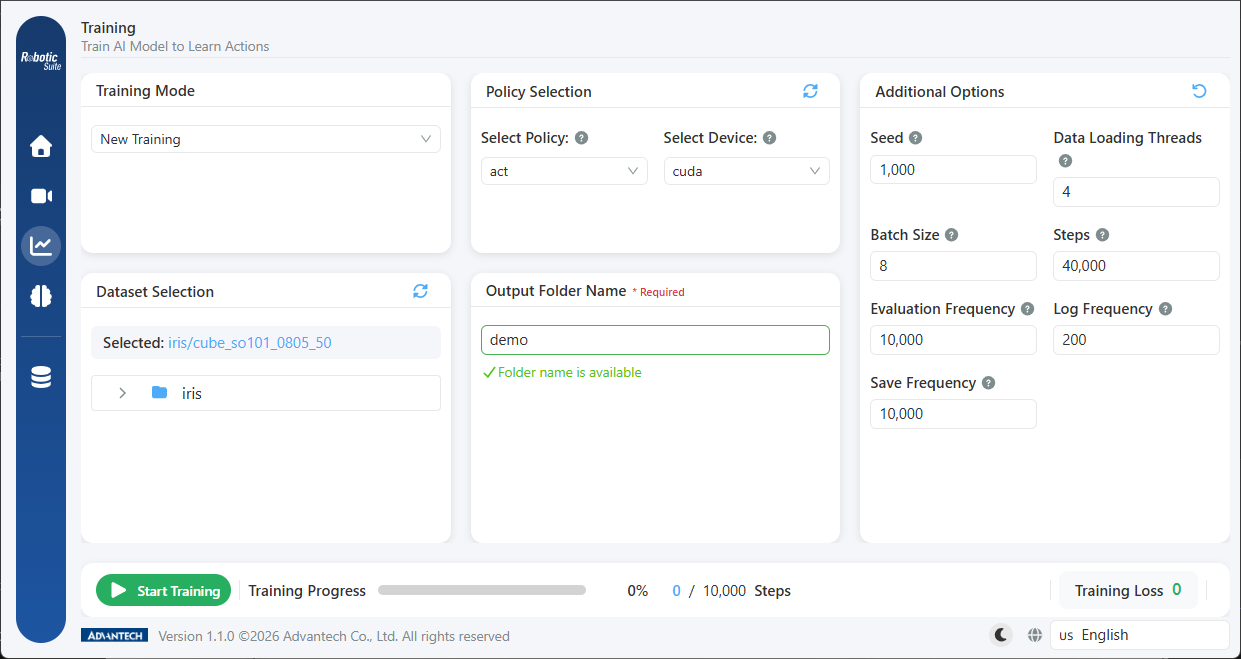
The training page contains the largest number of fields in the workflow. The number of fields actually displayed depends on the policy selected: the interface adapts to the policy and retains only those parameters that take effect for it.
Training Parameters
---
Training Monitoring & Resume
---
Four settings preceding training
First, dataset selection. Select the dataset to be used for this training run. Physically recorded and simulation-generated data are indistinguishable at this point, as both are in the LeRobot standard format and appear in the same list. Where a merge operation has been performed, the merged dataset should be selected.
Second, policy selection (ACT / GR00T N1.5). This is the branch point described in Policy Selection, and simultaneously determines the deployment hardware subsequently available.
Third, device selection. The device list on the training page varies by host configuration: where an NVIDIA GPU is present, GPU (CUDA) and CPU are offered; otherwise GPU (OpenVINO) and CPU. The interface hint notes that GPU computation is substantially faster than CPU, and a GPU should therefore be selected where one is available.
GPU (TensorRT) appears only on the inference page, as it belongs to the deployment stage. Its absence from the training page is expected behaviour.
Fourth, output folder name. Specifies the storage location for the training artifacts. Approximately one second after input ceases, the platform automatically checks whether the name is already in use and displays the result beneath the field (available or already exists).
As training runs are measured in hours, using an existing name may result in previous training artifacts being overwritten, a condition that is generally identified only after the run completes. It is recommended that identifiable information — such as task name, policy, and version — be incorporated into the name.
Next: Training parameters.