Training Parameters
Each parameter on the training page carries a default value. These defaults are initial reference values configured for the respective policy, and are not optimal values applicable to all datasets and hardware conditions. This chapter describes the function of each parameter and the effect of adjusting it.
1. The policy determines the fields displayed
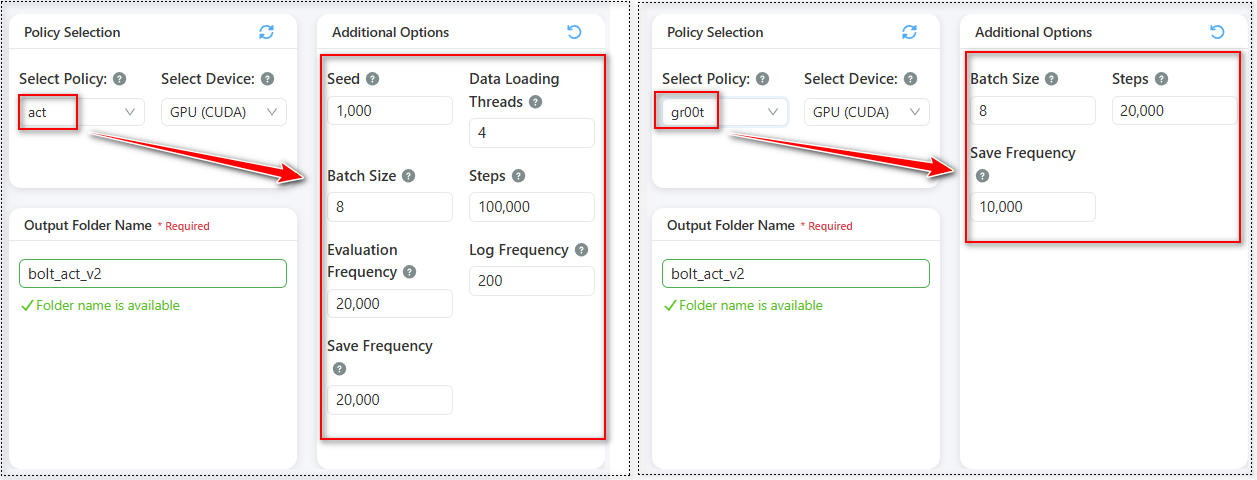
The parameter area of the training page adapts its content to the policy selected (act on the left of the figure above, gr00t on the right; the areas outlined in red are those that change):
- ACT selected: all seven fields are displayed.
- GR00T N1.5 selected: only three fields are displayed — batch size, steps, and save frequency.
The basis for the difference
The four fields not displayed (seed, num workers, eval frequency, and log frequency) are not received by GR00T's training process, and entering values would not affect the training result. The interface conceals them rather than retaining them as editable fields, and consequently the fields displayed are the fields that take effect.
Where training performance does not meet expectations, the cause does not lie in the parameters on this page; refer to the discussion of GPU utilization in Training Monitoring.
Differences in default values
On switching policies, the values displayed are automatically replaced with the initial values for that policy:
| Item | ACT | GR00T N1.5 |
|---|---|---|
| Nature of learning | Training from scratch | Fine-tuning on a pretrained base |
| Batch size | 8 | 8 |
| Steps | 100,000 | 20,000 |
| Save frequency | 20,000 | 10,000 |
| Seed / num workers / eval frequency / log frequency | Displayed | Not displayed |
This difference derives from the nature of learning in each policy: ACT must learn the complete motion from scratch and requires a higher number of iterations, whereas GR00T N1.5 fine-tunes a pretrained model that already possesses general robotic motion capability and requires substantially fewer steps, with the save frequency shortened accordingly. The default batch size is the same for both policies; the GR00T model is, however, larger in scale and consumes more GPU memory at a given batch size, so its practical upper limit is lower.
Order of configuration Switching policies overwrites values that have already been modified. This is expected behaviour, as the parameter set for the previous policy is not applicable to the new one. The policy should therefore be determined first and the parameters adjusted subsequently.
2. Parameter descriptions
Expanding "Additional Options" reveals the parameter fields. The seven items below constitute the complete list for ACT; when GR00T N1.5 is selected, only three are displayed.
1. Batch Size — default 8 for both policies
Definition: The number of data samples processed together in each model update.
Effects:
- Value too small: the number of samples informing each update is insufficient, the direction of learning is readily influenced by individual samples, and training is unstable.
- Value too large: the run may terminate due to insufficient memory; even where execution succeeds, an excessively large batch does not necessarily produce a better result.
- Hardware constraint: this is the parameter with the most direct effect on GPU memory consumption among the seven. Where training cannot start or terminates due to insufficient memory, this value should be reduced first.
2. Steps — ACT default 100,000 · GR00T default 20,000
Definition: The total number of training updates.
Effects:
- Value too small: training concludes before the model has converged, and motion at inference is fragmented and imprecise.
- Value too large: in addition to extending the training duration, the model may overfit incidental features of the demonstration data, thereby reducing its capacity to handle variation.
- Hardware constraint: this value directly determines the duration of the training run.
3. Save Frequency — ACT default 20,000 · GR00T default 10,000
Definition: Training progress is saved at the specified step interval.
Effects:
- Value too small: frequent saving consumes disk space and marginally extends training duration.
- Value too large: more progress is lost in the event of an interruption. In the extreme case, where the save frequency exceeds the total steps, the run may conclude without producing any progress save.
- Recommendation: retaining several to ten save points across the run constitutes a reasonable initial configuration. ACT training runs are longer, and the default 100,000 ÷ 20,000 retains five save points; GR00T fine-tuning is substantially shorter, and the default 20,000 ÷ 10,000 retains two, which is sufficient. The shorter the run, the fewer save points are required.
Terminology The interface uses "save frequency" and "checkpoint path", while the product overview refers to "progress saves". The terms are equivalent: a checkpoint is a progress save taken during training.
4. Seed — default 1000 (ACT only)
Definition: The initial value controlling random behaviour during training. The value itself carries no significance.
Purpose: Fixing the same seed causes two runs to exhibit identical random behaviour, thereby confirming that any difference in effect arising from a parameter adjustment derives from that parameter rather than from randomness.
Recommendations:
- Hold constant when comparing parameter effects.
- When assessing model stability, train once with each of several seeds; markedly divergent results indicate that the data volume may be insufficient.
- Retain the default in general use.
5. Num Workers — default 4 (ACT only)
Definition: The number of threads reading training data in the background.
Effects:
- Value too small: the GPU waits for data after completing each batch, utilization cannot be raised, and training slows.
- Value too large: excessive CPU resources are consumed, competing with other processes.
- Assessment: observe GPU utilization during training; persistently low utilization generally indicates insufficient data supply.
6. Eval Frequency — default 20,000 (ACT only)
Definition: A model evaluation is executed at the specified step interval in order to monitor performance during training.
Effects:
- Value too small: evaluation itself consumes compute time, and excessive frequency extends the overall training duration.
- Value too large: performance variation during training cannot be observed.
7. Log Frequency — default 200 (ACT only)
Definition: Training metrics, principally loss, are recorded at the specified step interval. This value determines the update frequency of the loss figure displayed on screen.
Effects:
- Value too small: log volume is high and values fluctuate frequently, making the trend difficult to interpret.
- Value too large: the on-screen loss update interval is excessive, delaying identification of training anomalies.
- Recommendation: the default is appropriate for long training runs. It may be reduced when executing short test runs.
3. Method of parameter adjustment
The recommended approach is to execute a short trial run using the default values and adjust according to the result:
- Execute training using the defaults populated by the interface.
- Observe whether loss declines, and at what point it flattens (interpretation).
- If loss is still declining markedly at the conclusion of the run, the step count is insufficient and should be increased before retraining.
- If loss flattens early, the step count may be reduced and the time allocated to inference verification.
This approach is more reliable than adopting any given set of recommended values, as the required number of training steps depends on the characteristics of the dataset itself.
4. Adjustment according to dataset characteristics
Small number of demonstrations (approximately ten or fewer). Where data volume is insufficient, the model readily memorises the complete content of each episode. It is recommended that the step count not be extended excessively; where conditions permit, supplementing the data should take priority over extending training.
Large number of demonstrations (several dozen or more). Data volume is sufficient to support a longer training run. A moderate increase in step count is recommended, together with attention to GPU utilization, as data loading readily becomes the bottleneck once data volume increases (for ACT, num workers may be increased).
Long task motions with extended episode duration. The data volume per episode is high, concentrating memory pressure on batch size. A conservative batch size is recommended, together with a moderate increase in save frequency.
High-variability tasks (substantial variation in object position or appearance). Such tasks should employ GR00T (see Policy Selection). Rather than extending training, it should first be confirmed whether the data covers sufficient variation; where object position was fixed during demonstration, parameter adjustment cannot produce adaptive capability.
In two of the four cases above, the remedy lies in revising the data rather than the parameters. Where repeated parameter adjustment produces no progress, the cause generally lies in the data preparation stage.
5. New training and resume training
The "Training Mode" control offers two options:
New training. Training begins from the initial state. This is the default.
Resume training. Training continues from an existing progress save. Once selected, the progress save is specified via "Browse", and the platform loads it automatically upon selection.
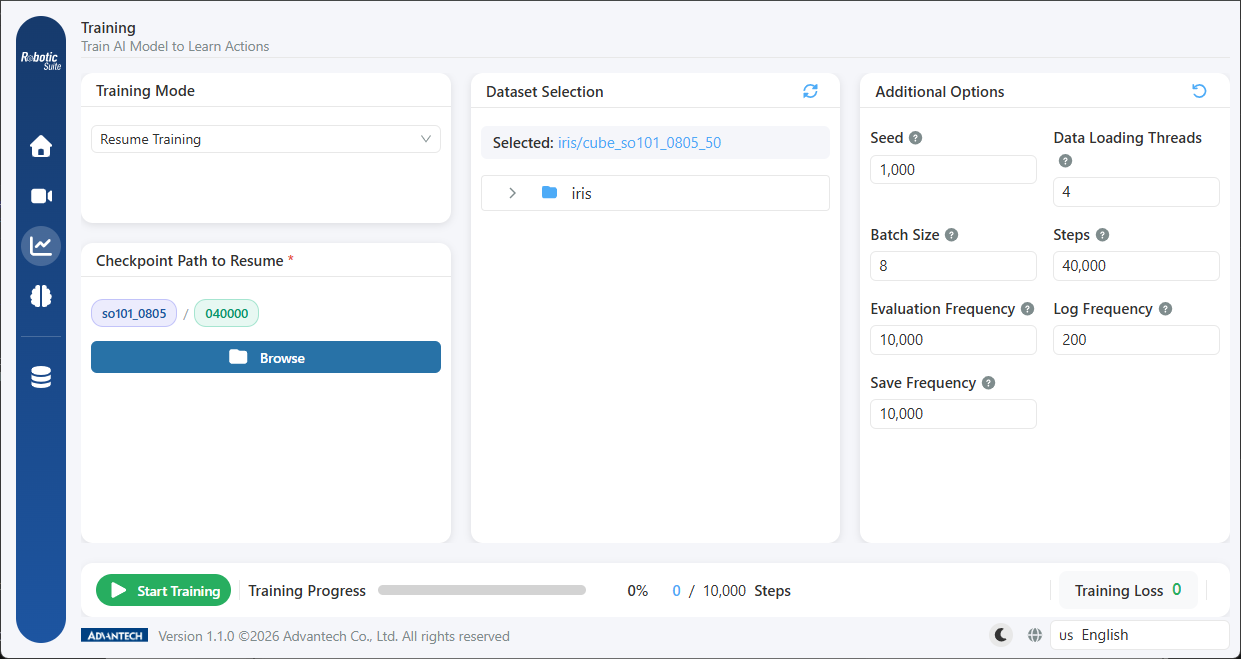
Following the load, the screen marks the selected save as "model name / step count" and restores the original parameters of that run. Resume training constitutes the continuation of the same run, and the parameters should therefore remain as originally configured.
For the applicable circumstances, see Training Monitoring & Resume.
Next: Training monitoring.