Training Monitoring & Resume
Once training has started, its execution state is presented through the status bar at the bottom of the page. Indications of training anomalies generally appear early in execution, and observation during the first few minutes after starting can therefore avoid extended unproductive runs.
This chapter describes the meaning of each indicator in the status bar, the means of distinguishing normal from anomalous conditions, and the applicable scope of resume training.
1. Composition of the status bar
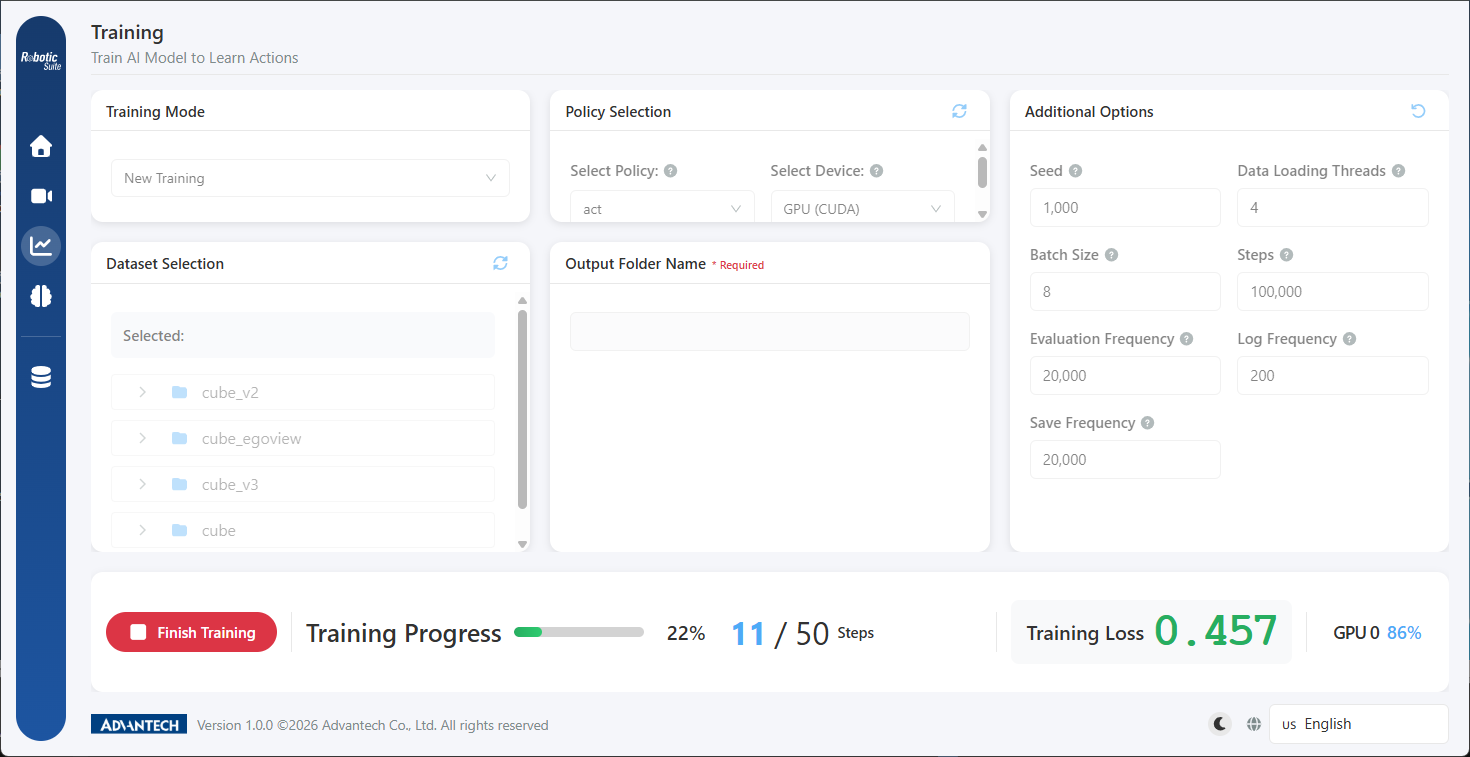
Once training has started, a persistent status bar is displayed at the bottom of the page comprising four categories of information:
| Item | Content |
|---|---|
| Training progress | Progress bar and percentage, calculated as current step ÷ configured total steps |
| Current step | Training steps completed |
| Training loss | The current loss value, the principal basis for assessing the state of learning |
| GPU status | Utilization of each GPU; hovering displays memory used, available, and total |
Progress reflects the remaining execution time, loss reflects the state of learning, and GPU utilization reflects the efficiency with which compute resources are being used. A "Finish Training" button occupies the far left of the status bar; its use is described in the fourth section of this chapter.
As the status bar occupies the foot of the page rather than a separate page, the area above it may still be scrolled during training to review the dataset and parameters used for the run, without interrupting it.
2. Interpretation of loss
Definition
Loss quantifies the divergence between the model's predicted motion and the demonstrated motion. A lower value indicates that the prediction more closely approximates the demonstration. Loss should exhibit a consistently declining trend during training.
Three common curve profiles
First, a steady decline followed by flattening. This is the normal profile: a rapid initial decline, a moderating middle phase, and fluctuation within a narrow band thereafter. Where the curve has remained flat for some time without material improvement, learning on the dataset has approached saturation and the marginal benefit of continued training is limited.
Second, no declining trend, or continuous oscillation. This is an anomalous profile, with the following common causes:
| Probable cause | Means of confirmation |
|---|---|
| Batch size too small; the direction of each update is influenced by individual samples | Increase the batch size and execute a short test run |
| Inconsistent data quality; excessive variation between demonstrations | Return to the data tools and review each episode |
| Policy unsuited to the nature of the task, for example a high-variability task using ACT | Refer to the criteria in Policy Selection |
Third, a decline followed by a rise beyond a certain point. This profile generally indicates overfitting: the model has begun to memorise incidental features of the training data and has consequently lost the capacity to handle variation. In this case the best-performing model is the save point preceding the rise, which is also the substantive reason for not configuring the save frequency too sparsely.
Differences in loss between the two policies
ACT learns from an initial state, and its loss begins at a higher value with a larger magnitude of decline. GR00T N1.5 fine-tunes a pretrained model and possesses considerable capability from the outset; its loss therefore begins at a lower value with a substantially smaller magnitude of decline.
Loss values are not comparable between policies. The smaller magnitude of decline in GR00T's loss is normal for fine-tuning and does not indicate that learning has not occurred.
When comparing the relative merits of the two policies, the only valid method is to execute inference and evaluate the arm's performance. Loss comparison carries meaning only between separate runs of the same policy on the same dataset.
3. Interpretation of GPU utilization
Loss reflects the effectiveness of learning; GPU utilization reflects whether compute resources are being used efficiently.
| Observed condition | Typical indication | Remedy |
|---|---|---|
| Consistently high utilization | Normal; the GPU is the compute bottleneck | None required |
| Substantial fluctuation with a low average | Insufficient data supply; the GPU waits for data between batches | ACT: increase "num workers". GR00T: the training page does not provide this field, so the dataset storage location should be addressed instead, for example by avoiding low-speed disks |
| GPU memory near capacity | Batch size is approaching its limit | No adjustment required while execution succeeds, though batch size should not be increased further and a second training run should not be executed concurrently |
| Utilization at or near zero | The CPU device may have been selected in error | Check the device selection on the training page |
In multi-GPU environments the status bar displays utilization for each card separately, and hovering reveals that card's memory detail, which constitutes the direct basis for determining whether batch size may still be increased.
4. Circumstances for terminating training early
The "Finish Training" button terminates training early while preserving the progress saves already completed.
Three circumstances apply:
First, loss has remained flat for a considerable period. The remaining steps will not produce material improvement, and allocating the time to inference verification is of greater benefit.
Second, a clear anomaly is present early in execution. For example, loss exhibiting no change, or GPU utilization at zero. Such indications are observable within the first few minutes; their cause lies in the configuration or the data, and continued execution will not improve the condition.
Third, a parameter has been found to be misconfigured. For example, GR00T selected while a hundred-thousand-step configuration remains in place.
Termination is not appropriate merely because a run has been executing for some time and an interim result is sought. The capability of a model mid-training is incomplete, and performance observed by terminating and executing inference at that point is insufficient to represent the actual effect of the dataset, and may lead to misjudgement of the policy or the data.
Following termination the system displays a "Training aborted early" notification, and the completed saves remain usable.
5. Resume training
Applicable circumstances
- Training was interrupted: a power interruption, a required host restart, or manual termination in order to release compute resources.
- Step count was insufficient: training completed, but loss was still declining markedly at its conclusion.
- Compute resources must be released temporarily: the GPU is allocated to other work during a given period and training is resumed subsequently.
Procedure
Select "Resume training" under "Training Mode" on the training page, then specify the progress save:
- Locate the save to be resumed using "Browse".
- On selection the platform loads it automatically, marking the selected save as "model name / step count".
- Confirm that the restored original parameters are correct.
- Select "Start Training".
The "model name / step count" displayed at step 2 must be confirmed as the intended save. A single training run produces multiple save points, and an incorrect selection will resume from an unintended point of progress without the system reporting an anomaly.
Circumstances in which resume training is not applicable
Resume training constitutes the extension of a given run rather than its correction. A new training run should be created in the following circumstances:
| Circumstance | Reason |
|---|---|
| The dataset has been changed, for example by recording additional demonstrations | Resumption retains the existing training state; continuing after a change of data yields results that are difficult to interpret |
| Parameters are to be modified and the run repeated | Loading a save restores the original parameters, as continuation is by definition the extension of the original configuration |
| Loss has not declined and an extended run is sought for observation | The cause generally lies in the data or the policy, and extending training will not alter the result |
| The policy has been changed | ACT and GR00T save formats are not compatible |
The governing principle is that a new training run should be created where the subject or method of training is to be changed; resume training is applicable only where the duration of training is to be changed.
6. Procedure following training
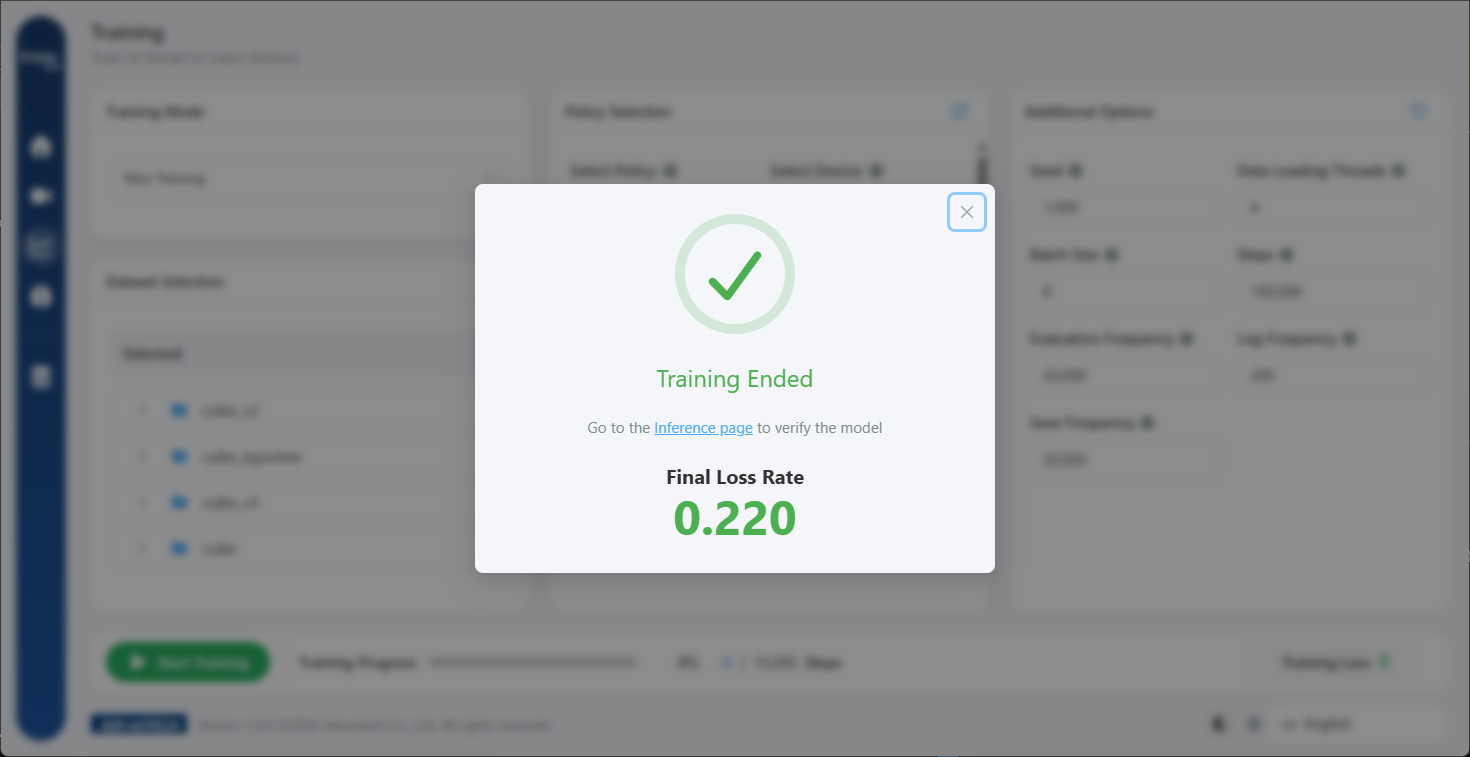
On completion of training, the platform displays a "Training Ended" summary containing the final loss rate and a link to the inference page.
This value should be recorded before the dialog is closed, together with the policy, dataset, and total steps used for the run — none of which appear in the summary. When subsequent model versions are trained, this record constitutes the sole basis for version comparison, and such comparison carries meaning only between runs of the same policy on the same dataset.
All values at the training stage are indirect indicators; the practical viability of the model must be confirmed through inference verification.
Next: Real-world validation.