Cross-Host Transfer & Deployment Planning
Where the complete workflow is executed on a single workstation, the resulting model is one that operates within that environment and has not yet entered actual production. This chapter describes the basis for separating the training host from the production host, and the means of transferring assets between them.
1. The cost basis for separated deployment
The hardware requirements of training and inference differ substantially in character:
| Item | Training stage | Production inference stage |
|---|---|---|
| Compute requirement | High; requires a GPU and substantial memory capacity | Low; need only support execution of a single model |
| Duration of use | Concentrated; hours to days | Continuous; operating at all times |
| Physical location | Server room or office environment, with controlled conditions | Production floor, with constrained space and cooling |
| Quantity | A single host suffices, shared across projects | One per station |
| Cost sensitivity | Higher specification is justifiable | Cost is multiplied by the number of stations |
It follows that installing a high-end GPU at each station converts a one-time training requirement into a fixed cost proportional to the number of stations. The appropriate configuration is therefore to consolidate training on a single training workstation, with each station equipped to the specification required for inference.
2. The relationship between installation and host role
The platform does not distinguish between a "training edition" and an "inference edition". Whether deployed on a training workstation or a production host, the recording, training, inference, and data tools entry points are all present with identical functionality.
This design confers two practical benefits: host roles may be adjusted as required, and a production host may be used for recording or training during off-peak periods without reinstallation or reconfiguration; and only a single installation procedure requires maintenance, so that the process is consistent when the number of hosts is expanded.
The designation of "training machine" and "inference machine" therefore belongs to deployment planning rather than constituting a role restriction imposed by the platform. The basis for separation is the cost and compute considerations described above. It also follows that the responsibility for planning rests with the deploying organisation: the platform does not prevent a training run from being started on a production host, and whether such an operation is appropriate should be determined by site operating procedures.
3. Deployment topologies
First, single-host configuration. All operations are executed on a single workstation. This is applicable to the evaluation stage, to teaching, and to small deployments involving a single station. The configuration requires no cross-host transfer, but host resources are fully occupied during training and production operations must be suspended concurrently.
Second, a training host with a single production inference host. This is the most common configuration. The workstation performs recording and training, the production host performs inference only, and data and models are transferred between them using short codes.
Third, a training host with multiple production inference hosts. A single model is deployed to multiple identical stations, and this configuration realises the greatest benefit from the separated architecture.
Where the third configuration is adopted, camera placement at each station must correspond to that used during training; otherwise the model's performance may vary between stations. Camera angle randomization in the simulation environment carries substantive value in this context: exposing the model in advance to a defined range of angular variation improves the stability of cross-station deployment.
4. Short-code transfer
Two directions of transfer are required under a separated architecture, and the platform handles both through a single mechanism:
| Direction | Content transferred | Label on the home flow diagram |
|---|---|---|
| Production / recording host → training workstation | Dataset | Data Transfer |
| Training workstation → production host | The trained model | Deploy Model |
Both paths are marked as cross-lane arrows on the home flow diagram.
Procedure
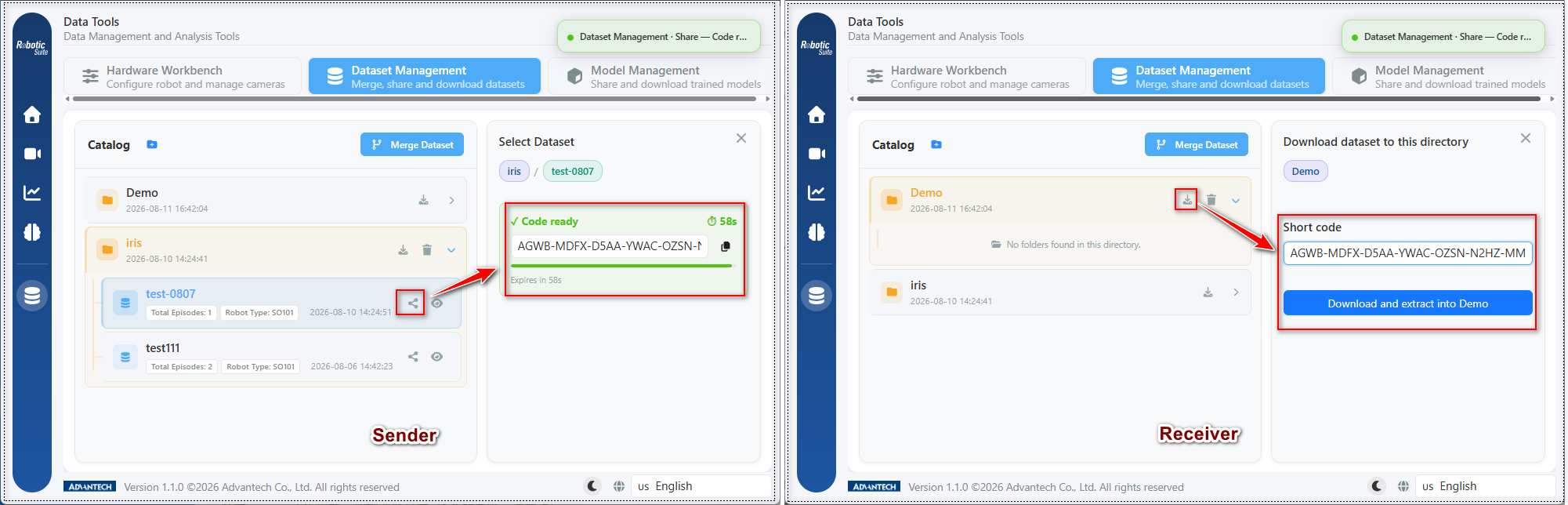
The transfer procedure is identical for datasets and models, and comprises three steps:
- Sending host (left above): expand the folder in the catalog, select the item to be transferred, and select the share icon on that row. The platform compresses the item and displays "Code ready" on the right, containing a short code (in the form
AGWB-MDFX-D5AA-YWAC-...) together with an expiry countdown; the code is obtained via the copy button. - Receiving host (right above): first select the destination folder in the catalog, then select the download icon on that row, whereupon a short code field appears on the right. Paste the code and select the button below it, which is labelled with the actual destination folder name (for example, "Download and extract into Demo").
- Completion: the platform downloads and extracts the item into that folder automatically.
The destination is determined by the operator's selection in step 2 rather than by the code; the selected folder should therefore be confirmed before receiving.
The validity period of a short code is measured in seconds The countdown begins as soon as the code is generated, and a new code must be generated once the period expires. This is a security measure, as the code itself constitutes an access credential and should not remain valid indefinitely.
Given the short validity period, both hosts should in practice be opened to this page before the code is generated, rather than generating the code and then proceeding to the other host.
Background execution
Transfers are executed in the background and do not require the operator to remain on the page. The platform handles compression, upload, download, and extraction, reporting progress through a floating status element; that element remains visible when other pages are opened, and an indicator is also displayed on the data tools entry in the sidebar.
Other operations may therefore be performed during a transfer, such as preparing the next batch of data on the training host.
5. Operation following deployment
Once the model has been deployed to the production host and inference verification has passed, the deployment workflow is complete. Two considerations apply to subsequent operation:
First, site conditions vary over time. Displacement of cameras by external force, seasonal variation in lighting, and changes of component supplier all cause model performance to degrade progressively. Where a decline in accuracy is observed, site conditions should be examined before the model itself.
Second, model updates may be performed incrementally. Improvement does not require starting from the initial state: additional demonstrations covering the new conditions may be recorded, merged with the existing dataset, and retrained, with the result deployed to the production host using a short code.
Next: Deployment checklist.