Object Perception
Object perception is the process of turning camera data into information that a robot can use to identify and locate a target object.
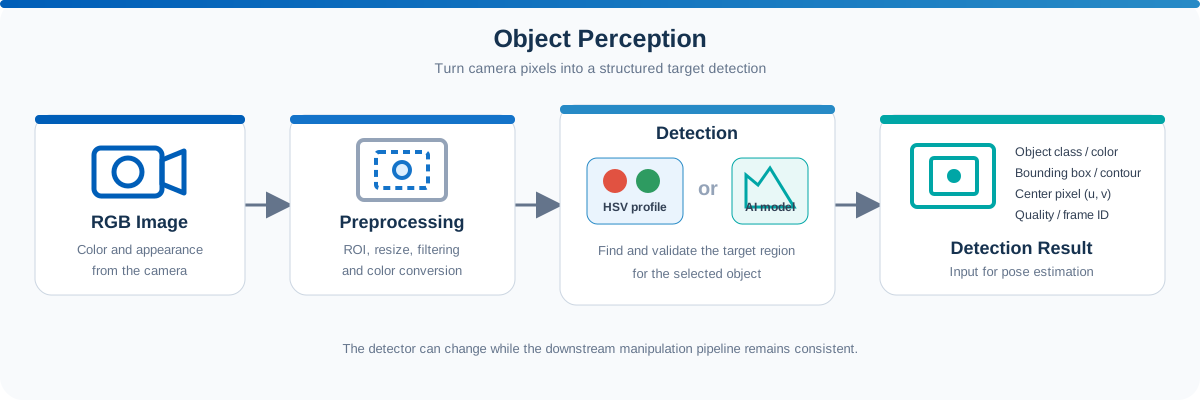
In a manipulation workflow, perception answers questions such as:
- What object is visible?
- Where is it in the image?
- Which image region belongs to the object?
- Is the detection reliable enough to continue?
The output of this stage becomes the input to pose estimation, which provides the spatial target required by later motion-planning and robot-action stages.
Role in a Manipulation Workflow
A camera produces raw images, but a robot arm cannot plan a grasp directly from image pixels. A perception algorithm must first extract a structured description of the target.
A typical workflow is:
Camera image → Image processing or AI model → Object detection result → Pose estimation
Depending on the application, a detection result may contain:
- Object class or target color
- Bounding box, contour, or segmentation mask
- Center pixel coordinates
- Detection confidence
- Timestamp and camera frame information
For a 2D detector such as the colored-block sample, the result is typically expressed in image coordinates. Converting this detection into a 3D pose that the robot can use is covered in Pose Estimation.
Camera Inputs
Manipulation applications commonly use an RGB camera or an RGB-D camera.
| Input | Information provided | Typical use |
|---|---|---|
| RGB image | Color, texture, and appearance | Object detection and classification |
| Depth image | Distance from the camera | 3D position estimation |
| Camera information | Intrinsic camera parameters | Converting pixels into 3D coordinates |
Object perception mainly operates on the RGB image. Depth and camera information are usually combined with the detection result in the following pose-estimation stage.
In ROS 2, these inputs are commonly published as sensor_msgs/msg/Image and sensor_msgs/msg/CameraInfo messages.
Common Detection Methods
The detection method should match the object and operating environment.
Color-Based Detection
Color-based detection separates objects according to a configured color range. It is easy to understand, requires no model training, and works well when the target has a distinctive color and the environment is controlled.
A common processing flow is:
- Convert the RGB or BGR image to HSV.
- Apply the target HSV range to create a binary mask.
- Remove small noise using image filters.
- Find connected regions or contours.
- Select the region that best matches the expected object.
- Calculate its center, boundary, and approximate image-plane orientation.
HSV is often preferred over RGB because color information is separated into hue, saturation, and value, making color thresholds easier to tune under moderate lighting changes.
The Robotic Suite sample separates configuration from detection:
- Color Profile Creation creates and saves a reusable HSV profile.
- Color Block Detection & Position Estimation loads the profile and detects matching blocks from an RGB-D stream.
AI-Based Detection
AI models can identify object classes with more complex shapes, textures, and backgrounds. Depending on the model, the output may be a bounding box, segmentation mask, keypoints, or object pose.
AI-based detection is useful when:
- Objects cannot be distinguished reliably by color alone.
- Multiple object classes must be recognized.
- Lighting and backgrounds vary significantly.
- The application requires semantic information about the object.
However, it normally requires a trained model, representative data, and additional computing resources.
The perception method can be replaced without redesigning the complete manipulation pipeline. As long as the replacement detector provides a consistent output interface, the downstream pose-estimation and motion-planning stages can remain largely unchanged.
Example: Detecting Colored Blocks
The Robotic Suite manipulator example uses colored blocks to demonstrate the complete workflow.
For each target color, the perception node:
- Loads a saved HSV color profile.
- Receives the latest RGB image.
- Limits processing to a region of interest when required.
- Creates a mask for the selected color.
- Finds candidate contours and filters small regions.
- Selects the target block.
- Reports its center and approximate image-plane orientation.
The colored-block example is intentionally simple. Its purpose is to make the connection between camera input, object detection, pose estimation, and robot motion easy to observe. The same pipeline can later use an AI detector for more complex objects.
Detection Quality
A detection result should be validated before it is passed to the robot. Common checks include:
- The detected region is larger than a minimum area.
- The object lies inside the configured image region of interest.
- The detection confidence or geometric criteria meet the required threshold.
- The detection remains stable across several frames.
- Only one valid target is selected when the task expects one object.
Typical causes of unstable detection include changing illumination, reflections, shadows, motion blur, occlusion, and colors similar to the background.
For color-based detection, recreate or adjust the color profile when the camera, lighting, or workspace changes significantly.
Key Takeaways
- Object perception converts camera images into structured target information.
- A 2D perception result usually describes the target in image coordinates and must be converted before it can be used as a 3D robot target.
- Color-based detection is suitable for simple, controlled teaching examples.
- AI detection can replace the front end when objects or environments become more complex.
- Reliable detection is required before pose estimation and robot motion can begin.
Next: Use the detection result with depth and camera calibration in Pose Estimation.