General
Nodes missing from ROS2 node list after relaunch
This issue is triggered because rosnode start and close too quickly, ROS2 daemon keeps some nodes as “alive” in the cache, as it takes some time of them being unresponsive before eliminating them.
If run ros2 node list can’t find a specific rosnode, you can try run ros2 node list --no-daemon, then you will get the missing nodes.
Also you can run ros2 daemon stop; ros2 daemon start to restart ROS2 daemon and update the rosnode list.
Disabling shared memory for ROS2
FastDDS allows for providing a configuration XML file at runtime in order to customize several aspects of the middleware. Such as, forcing the transport to use UDPv4. The XML profile is passed through an environment variable:
$ export FASTRTPS_DEFAULT_PROFILES_FILE=myProfileLocation/fastdds_no_shared_memory.xml
The fastdds_no_shared_memory.xml content is as follows.
<?xml version="1.0" encoding="UTF-8" ?>
    <profiles xmlns="http://www.eprosima.com/XMLSchemas/fastRTPS_Profiles" >
        <transport_descriptors>
            <transport_descriptor>
                <transport_id>CustomUdpTransport</transport_id>
                <type>UDPv4</type>
            </transport_descriptor>
        </transport_descriptors>

        <participant profile_name="participant_profile" is_default_profile="true">
            <rtps>
                <userTransports>
                    <transport_id>CustomUdpTransport</transport_id>
                </userTransports>

                <useBuiltinTransports>false</useBuiltinTransports>
            </rtps>
        </participant>
    </profiles>
OpenGL error when running gazebo
If get OpenGL error when running gazebo.

Can change render-engine to ogre, and try again.
$ ign gazebo tugbot_warehouse.sdf --render-engine ogre
How to convert ROS1 bag file to ROS2 bag file
refer to : https://gitlab.com/ternaris/rosbags Download and install.
$ git clone https://gitlab.com/ternaris/rosbags.git
$ pip install rosbags
Convert rosbag to ros2bag.
- Go to convert folder.
$ cd rosbags/src/rosbags/convert
2.Add the following code to the last line of converter.py
convert_1to2("src", "dst", "excluded topics", "included topics")
for example:
...
    try:
        func(src, dst, exclude_topics, include_topics)
    except (ReaderError1, ReaderError2) as err:
        raise ConverterError(f'Reading source bag: {err}') from err
    except (WriterError1, WriterError2) as err:
        raise ConverterError(f'Writing destination bag: {err}') from err
    except Exception as err:
        raise ConverterError(f'Converting rosbag: {err!r}') from err

convert_1to2("/home/user/Downloads/dataset.bag", "/home/user/Downloads/dataset", "", "/points_raw /imu_correct")
- Run convert.
$ python3 converter.py
How to set ROS_DOMAIN_ID
Set ROS_DOMAIN_ID in host It can set environment variables in the .bashrc file.
$ echo "export ROS_DOMAIN_ID=<your_domain_id>" >> ~/.bashrc
$ source ~/.bashrc
Confirm whether the variable is modified successfully.
$ echo $ROS_DOMAIN_ID
Set ROS_DOMAIN_ID in docker container
Step1: Open specified docker-compose.yml
$ cd /usr/local/Advantech/ros/container/docker/docker-compose/<docker_container_name>
$ vim docker-compose.yml
Step2: Set ROS_DOMAIN_ID=your_domain_id in docker-compose.yml Note: If you want to follow the host's ROS_DOMAIN_ID variable, please set ROS_DOMAIN_ID=your_domain_id
.
.
.
   environment:
    - ROS_DOMAIN_ID=<your_domain_id>
.
.
.
Step3: Restart container for update environment variables of docker container
$ cd /usr/local/Advantech/ros/container/docker
$ ./stop.sh <docker_container_name>
$ ./launch.sh <docker_container_name>
Step4: Confirm whether the variable is modified successfully in container
$ docker exec -it <docker_container_name> bash
$ echo $ROS_DOMAIN_ID
Known issues of realsense camera
- IMU issues If you can't use the D435i's IMU on ROS2, and see "Permission denied" error message.
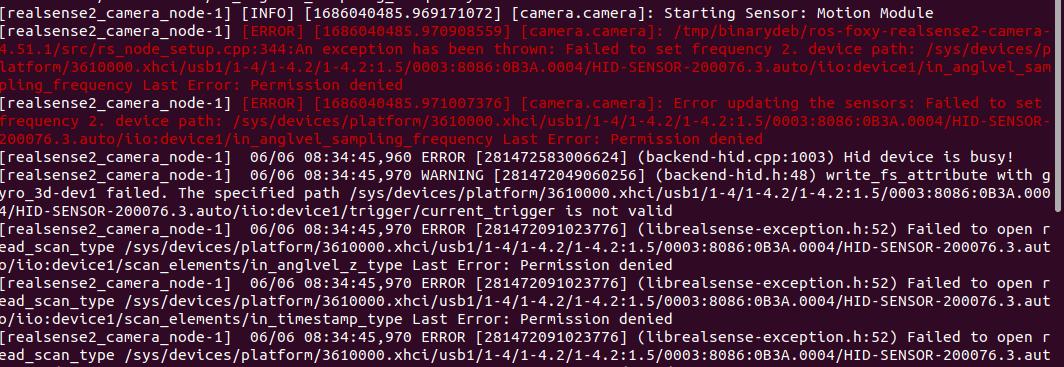
You can install a patch to resolve this issue. Reference solution: librealsense patch
- Pointcloud issues When using the realsense camera in "NVIDIA Jetson platform", the pointcloud cannot be generated on ROS2. Reference solution: Pointcloud issues