ASR-D501 for Autonomous Flight Core
This document provides an overview of the demonstrated Advantech Drone Module Solution. Powered by the ASR-D501 (QCS6490) platform, this demo showcases Edge AI Computing, complex sensor fusion, and flight control integration.
Key Features of ASR-D501
The ASR-D501 is a compact, industrial-grade Single Board Computer (SBC) designed as a companion and mission computer for autonomous drones, powered by the Qualcomm QCS6490 SoC.
- High AI Performance at Low Power: Equipped with an 8-core Kryo 670 CPU (up to 2.7 GHz), Adreno 643 GPU, and a dedicated NPU delivering up to 12.3 TOPS of on-device AI computing—ideal for real-time vision processing and obstacle avoidance without draining the flight battery.
- Extensive Drone Sensor & Vision Connectivity: Features native support for up to 5x MIPI-CSI camera inputs, dual USB Type-C, and high-bandwidth interfaces, allowing direct connection of stereo cameras, MIPI sensors, and LiDAR.
- Ready for Flight Controller Integration: Built-in 2x CAN-FD, 3x UART, and 2x I2C support communication with the flight controller via the MAVLink protocol.
- Optimized Drone & Robotics Software Stack: Supports Ubuntu and Advantech Robotic Suite with compatible ROS 2 and MAVROS/MAVSDK.
- Reliable for Diverse Environments: Supports a wide operating temperature range from -20°C to 70°C, ensuring stable flight operations across various extreme weather conditions.
Hardware Platform & Components
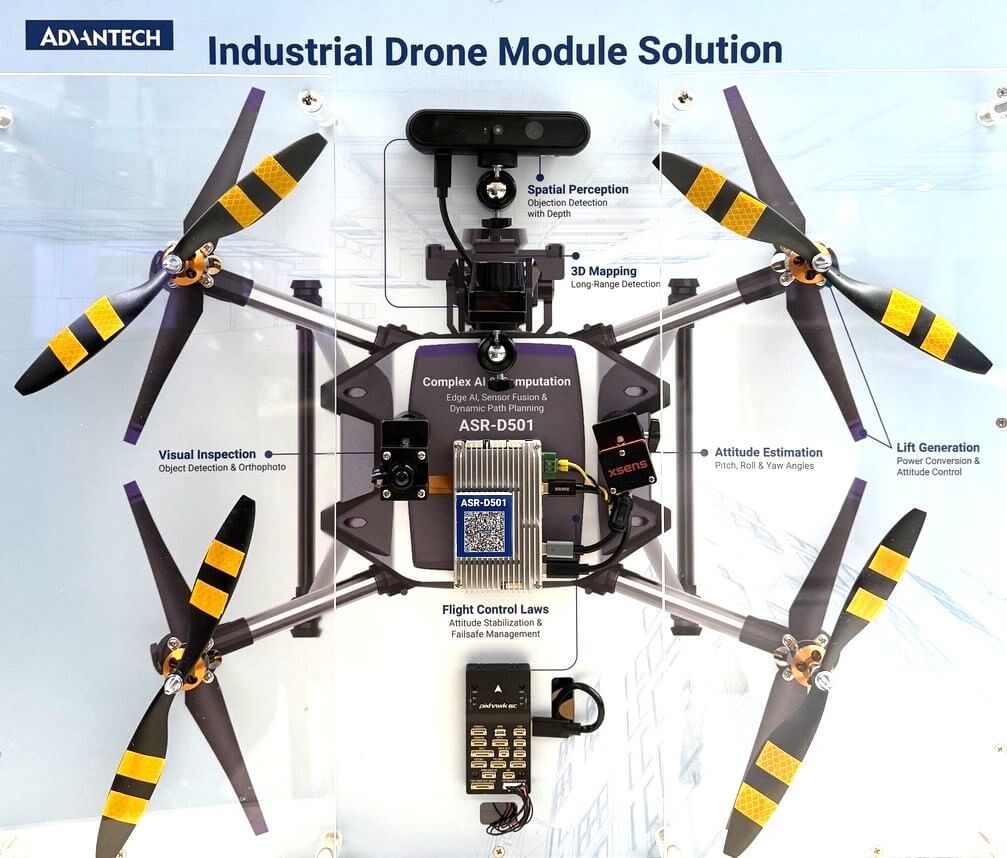
The physical demonstration unit utilizes the following key hardware components:
- Computing Platform: ASR-D501 (Qualcomm QCS6490)
- Flight Controller: Pixhawk® 6C or CubePilot Cube Orange+
- 3D Camera: Orbbec Gemini 335Lg (USB) or Realsense D457 (USB)
- IMU: Xsens MTi-630 or Xsens MTi-320
- 2D LiDAR: OASAB0649/ OASAB0702
- MIPI Camera: Thundercomm IMX577 Camera Module
Environment Setup
Before running the demo modules, there are a few prerequisite steps to ensure the system environment is properly configured.
1. Configure Swapfile (Recommended)
Setting up a swapfile is highly recommended to prevent out-of-memory (OOM) issues during intensive AI inference tasks or compiling large software packages.
# Allocate a 16GB file for swap space
sudo fallocate -l 16G /swapfile

# Set the correct permissions so only root can read and write (Security requirement)
sudo chmod 600 /swapfile

# Set up the file as a Linux swap area
sudo mkswap /swapfile

# Enable the swap space to start using it immediately
sudo swapon /swapfile

# Add the swap configuration to /etc/fstab to make it permanent across system reboots
echo '/swapfile none swap sw 0 0' | sudo tee -a /etc/fstab

# Verify that the swap space is active and check current memory usage
free -h
2. Install ROS 2 Jazzy
The robotic components and flight control integrations in this project rely on the ROS 2 framework.
Please follow the instructions in the ROS 2 Jazzy Official Documentation to install ROS 2 Jazzy on your system.
Demo Modules Overview
The demonstration is divided into five main modules running on the ASR-D501.
1. MIPI Camera Demo
This module demonstrates real-time visual inspection and object detection utilizing the IMX577 MIPI camera directly connected to the ASR-D501.
<Reference Guide – Coming Soon>
2. Obstacle Avoidance Concept (USB Camera Inference on ASR-D501)
This module showcases the core AI perception capability of the drone demo. In the complete physical demonstration, the ASR-D501 processes RGB and depth data to estimate obstacle information and generates avoidance commands for the flight controller. The flight controller then performs the low-level flight control and motor actuation.
For developer reference, we provide a standalone inference guide focusing on the AI perception phase.
- AI Inference: The NPU processes camera streams using a YOLO model to detect objects (e.g., Birds or Persons).
- Action & Control Concept: Based on the detected object's position and distance, the ASR-D501 calculates the required avoidance command or flight setpoint and sends it to the Pixhawk flight controller. The flight controller remains responsible for attitude control, motor mixing, and motor outputs.
Try it out:
We have provided a complete tutorial on how to build an obstacle avoidance pipeline on the ASR-D501.
👉Reference Guide – Obstacle Avoidance on ASR-D501 with Qualcomm AI Hub Models
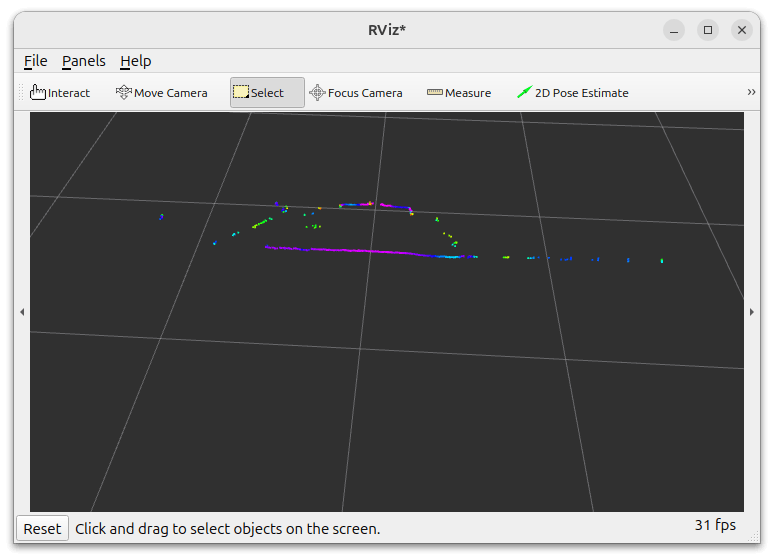
3. LiDAR System
Showcases 2D spatial mapping and long-range detection capabilities.
<Reference Guide – Coming Soon>
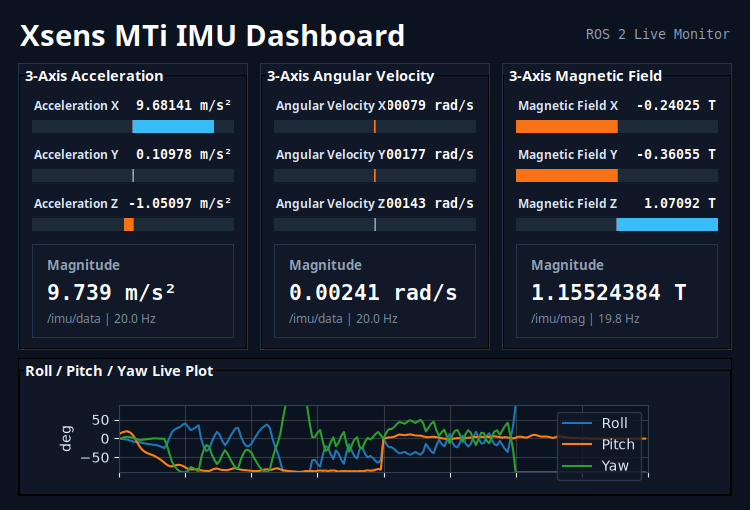
4. Xsens MTi-630 IMU Dashboard
Provides real-time attitude estimation and 9-axis sensor monitoring for flight control stability.
<Reference Guide – Coming Soon>
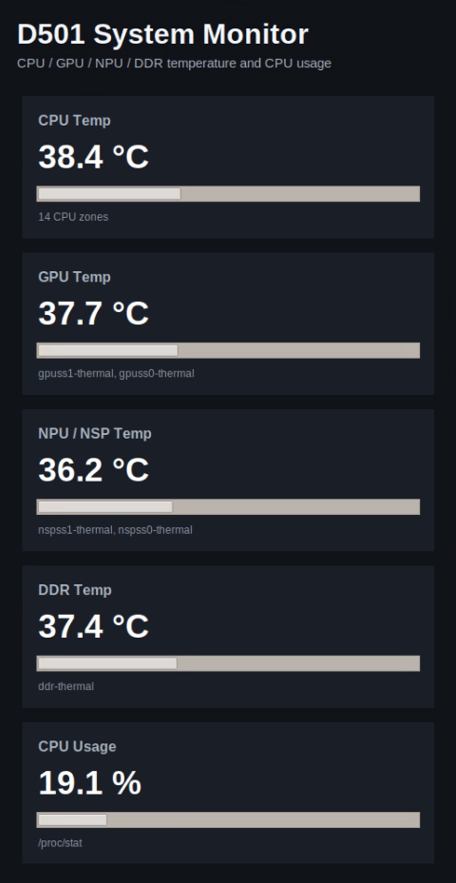
5. ASR-D501 System Monitor
A UI for tracking system utilization during complex AI computations and multi-sensor processing.
- Monitored Stats: Tracks live metrics such as CPU usage and temperatures across different compute units (CPU, GPU, NPU).
<Reference Guide – Coming Soon>
Next Steps
- 🚀 Deploy Your First Model - Follow the Obstacle Avoidance on ASR-D501 with Qualcomm AI Hub Models to run accelerated YOLO models on the ASR-D501 NPU.
- 📡 Sensor & Flight Integration - Learn how to interface external sensors (IMU, LiDAR, Cameras) and establish MAVLink communication with flight controllers.
- ⚙️ Performance Tuning - Explore QNN profiling and power management settings to balance AI throughput and battery efficiency during flight.
- 🛠️ Hardware Integration & Carrier Design - Consult the ASR-D501 Carrier Board Design Guide and pinout specifications for drone airframe integration.