LLM Edge Deployment and Optimization with llama.cpp
Complete guide for deploying and optimizing Large Language Models on edge AI platforms using llama.cpp.
Use Case
Application: LLM inference on edge AI devices (NVIDIA Jetson, Intel x86, etc.)
Background:
- Customer requirement: Improve LLM inference speed on edge platforms
- Platform:ASR-A702 / NVIDIA Jetson Thor
- Model: Qwen3.6 via llama.cpp
- Challenge: Output speed of 46 t/s (tokens per second) affects user experience
Background Analysis
Why Edge AI for LLM?
Running LLMs on edge devices offers significant advantages:
Benefits:
- ✅ Low latency inference (no network round-trip)
- ✅ Privacy and data security (local processing)
- ✅ Offline capability (no internet required)
- ✅ Cost-effective (reduced cloud costs)
- ✅ Scalability (distributed deployment)
llama.cpp vs Ollama Comparison
llama.cpp vs Ollama Comparison
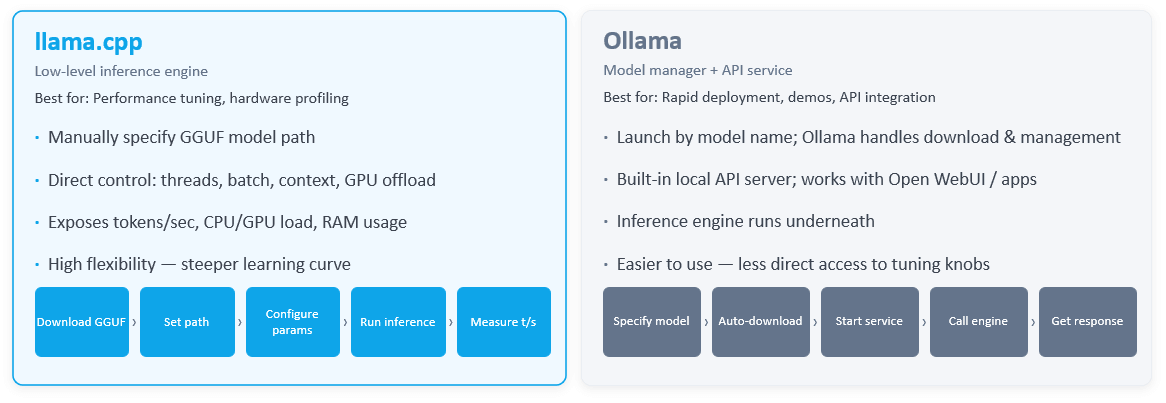
💡 Note: This comparison highlights the architectural and performance differences between llama.cpp and Ollama for edge deployment scenarios.
Performance Context
Tokens Per Second (t/s):
- Human reading speed: 15-20 t/s
- Current system: 48 t/s (2× human reading speed)
- Target: Optimize for better user experience
Edge vs Cloud:
- Edge device inference ≠ cloud multi-GPU data center
- Goal: Systematically test how settings affect inference speed
Implementation Steps
Step 1: Verify GPU Acceleration
Prerequisites:
- NVIDIA JetPack SDK installed
- CUDA acceleration enabled
- GPU drivers properly configured
Verification:
# Check JetPack version
cat /etc/nv_tegra_release

# Check GPU status
nvidia-smi

# Verify CUDA availability
/usr/local/cuda/bin/nvcc --version
Step 2: Download and Compile llama.cpp
Requirements:
- CUDA support enabled
- CMake build system
- NVIDIA GPU with compute capability ≥ 7.0
Build Procedure:
# Clone llama.cpp repository
git clone https://github.com/ggml-org/llama.cpp
cd llama.cpp

# Configure with CUDA support
mkdir build && cd build
cmake .. -DLLAMA_CUDA=ON -DCMAKE_CUDA_COMPILER=/usr/local/cuda/bin/nvcc
make -j$(nproc)
Output Binaries:
llama-cli: Interactive inference interfacellama-bench: Performance benchmarking toolllama-server: HTTP server for API access
Step 3: Download GGUF Model
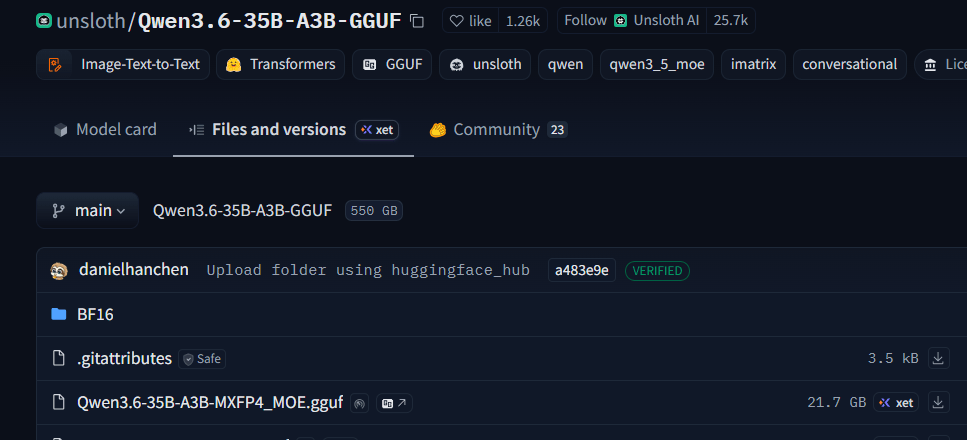
Download model from huggingface, we use unsloth/Qwen3.6-35B-A3B-GGUF as example.
Step 4: Run Baseline Test (Customer Parameters)
Baseline Test:
./build/bin/llama-bench \
    -m ./Qwen3.6-35B-A3B-MXFP4_MOE.gguf \
    -ngl 99          \        # offload all layers to GPU
    -fa 1            \        # enable flash attention
    -ub 2048 -b 4096 \
    -t 12            \        # 12 threads (14 cores available)
    --cache-type-k q8_0 --cache-type-v q8_0 \
    -p 512,1024,2048,4096,8192,16284,32768  \
    -n 128,256,512,1024,2048
Results:
- Initial throughput: ~48 t/s
- System runs stably but performance is limited
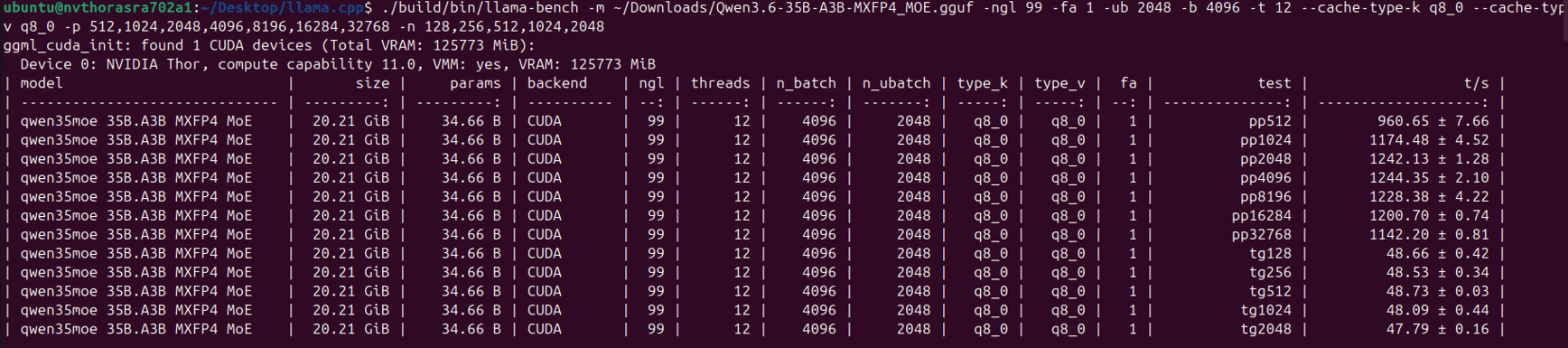
Step 5: Thermal Management - Fan at Max Speed
Action:
- Set fan speed to 100% maximum
- Monitor thermal throttling status
Verification:
$ sudo systemctl disable nvfancontrol.service
$ sudo systemctl stop nvfancontrol
$ sudo su  //the password is ubuntu
$ echo 0 > /sys/class/hwmon/hwmon2/pwm1
Step 6: Lock to Maximum Performance Mode
Performance Profile:
# Enable maximum performance mode
sudo nvpmodel -m 0

# Lock CPU and GPU frequencies
sudo jetson_clocks
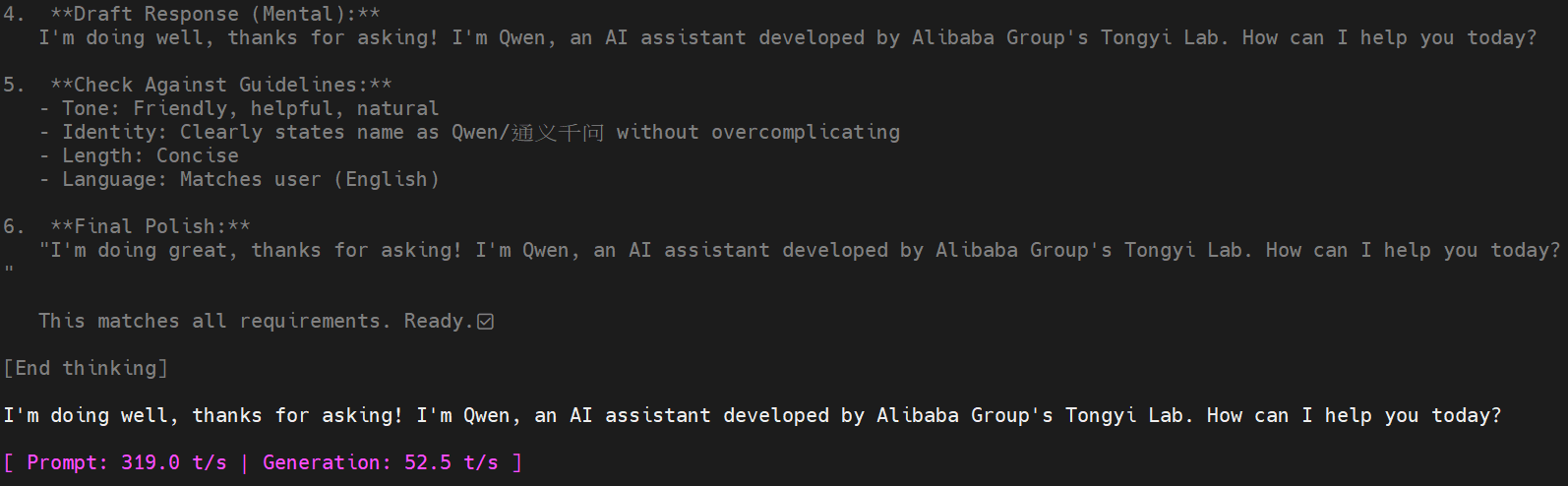
Step 7: Run Model Inference (llama-cli)
Optimized Execution:
./build/bin/llama-cli -m ~/Downloads/Qwen3.6-35B-A3B-MXFP4_MOE.gguf \
-ngl 99 \
-fa 1   \
-ub 2048 \
-b 4096 \
-t 12   \
--cache-type-k q8_0 --cache-type-v q8_0 \
-n 512 \
-p "what's up"
Results:
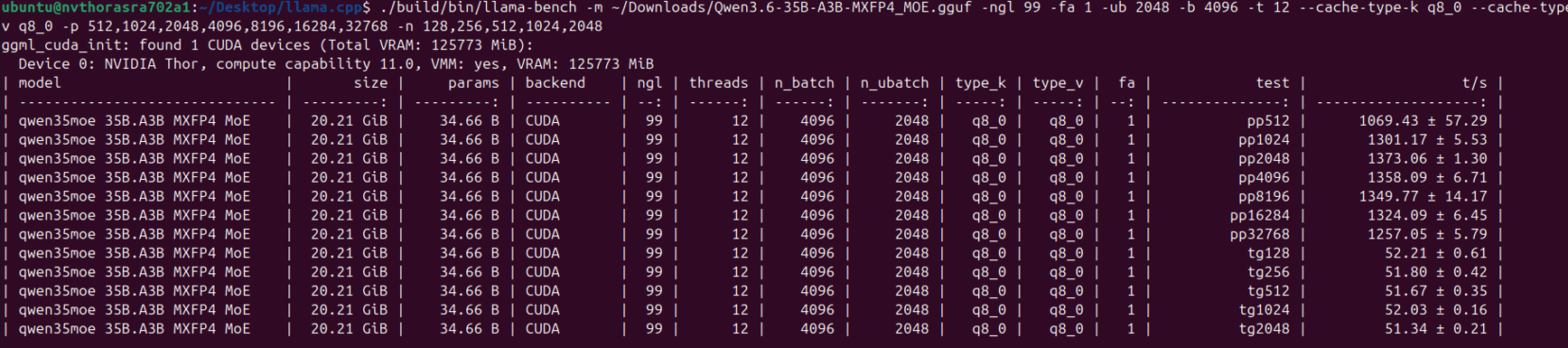
- Baseline: ~48 t/s (with thermal throttling)
- After performance mode: ~52 t/s (8% gain)
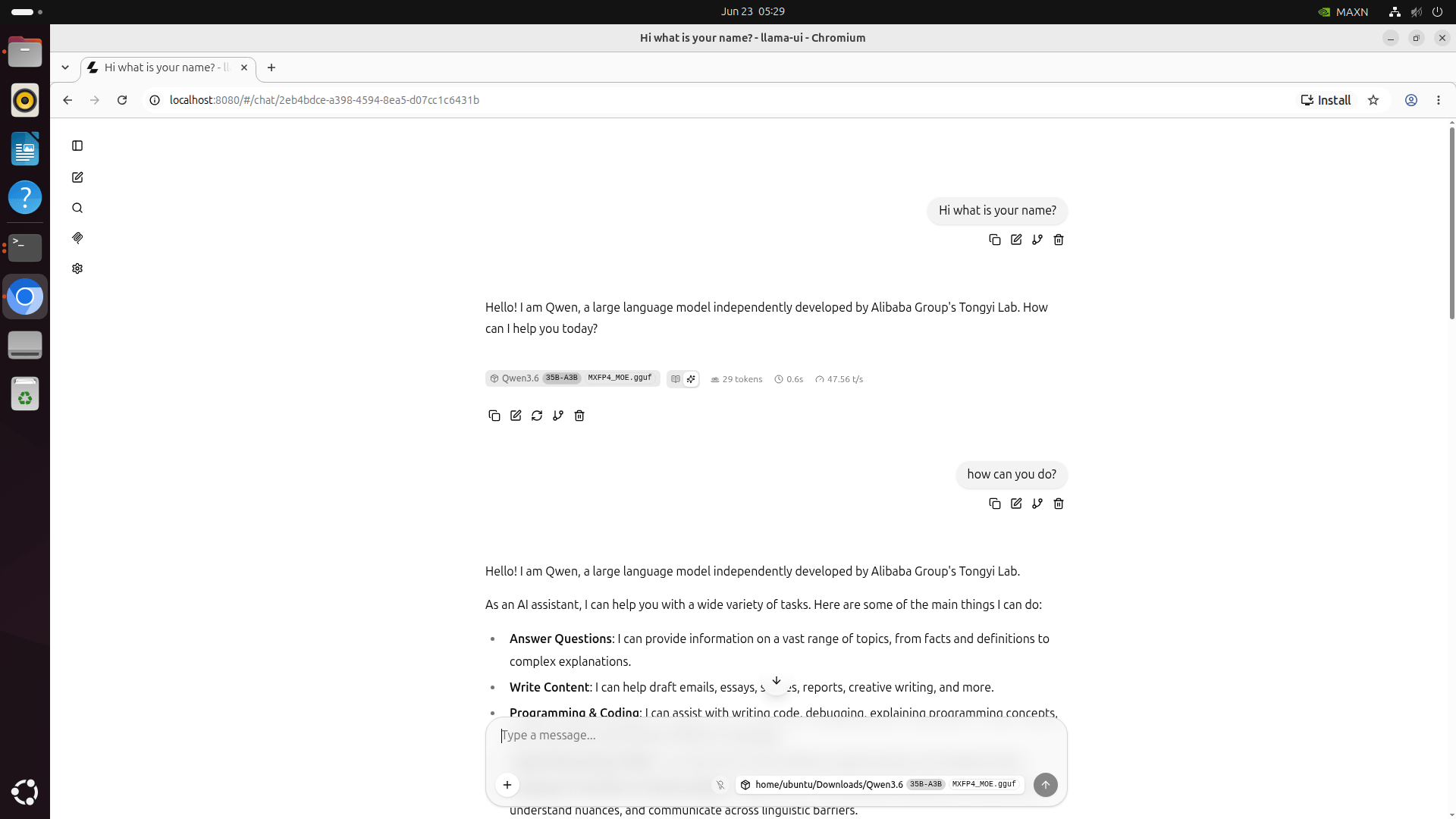
Step 8: Launch Web UI (llama-server)
Server Setup:
./build/bin/llama-server \
  -m ~/Downloads/Qwen3.6-35B-A3B-MXFP4_MOE.gguf \
  -ngl 99 \
  -fa 1 \
  -ub 2048 \
  -b 4096 \
  -t 12 \
  --cache-type-k q8_0 \
  --cache-type-v q8_0 \
  --ctx-size 8192 \
  --host 0.0.0.0 \
  --port 8080
Access from browser
Conclusion
Key Findings
Baseline Reproduced:
- ✅ ~48 t/s confirmed
- ✅ At 2× human reading speed, this is not a user-experience problem on edge device
Hardware Configuration:
- ✅ Fan at 100% + MAX power mode (nvpmodel -m 0) + locked clocks (jetson_clocks)
- ✅ Throughput: 52 t/s — an 8% gain over baseline
Recommendations
-
Thermal Management is Critical
- Ensure adequate cooling for sustained performance
- Use maximum fan speed during inference
- Monitor thermal throttling indicators
-
Performance Mode Lock
- Always use
nvpmodel -m 0for maximum performance - Apply
jetson_clocksto lock frequencies
- Always use